








Lakebase Search is developed by Databricks. These extensions are part of the shared technology foundation between Neon and the Databricks Lakebase platform.
Lakebase Search adds vector, keyword, and hybrid search to your Neon project. Install lakebase_vector for vector search, lakebase_text for BM25 keyword search, and lakebase_tokenizer for configurable tokenization.
Vector, keyword, and hybrid search
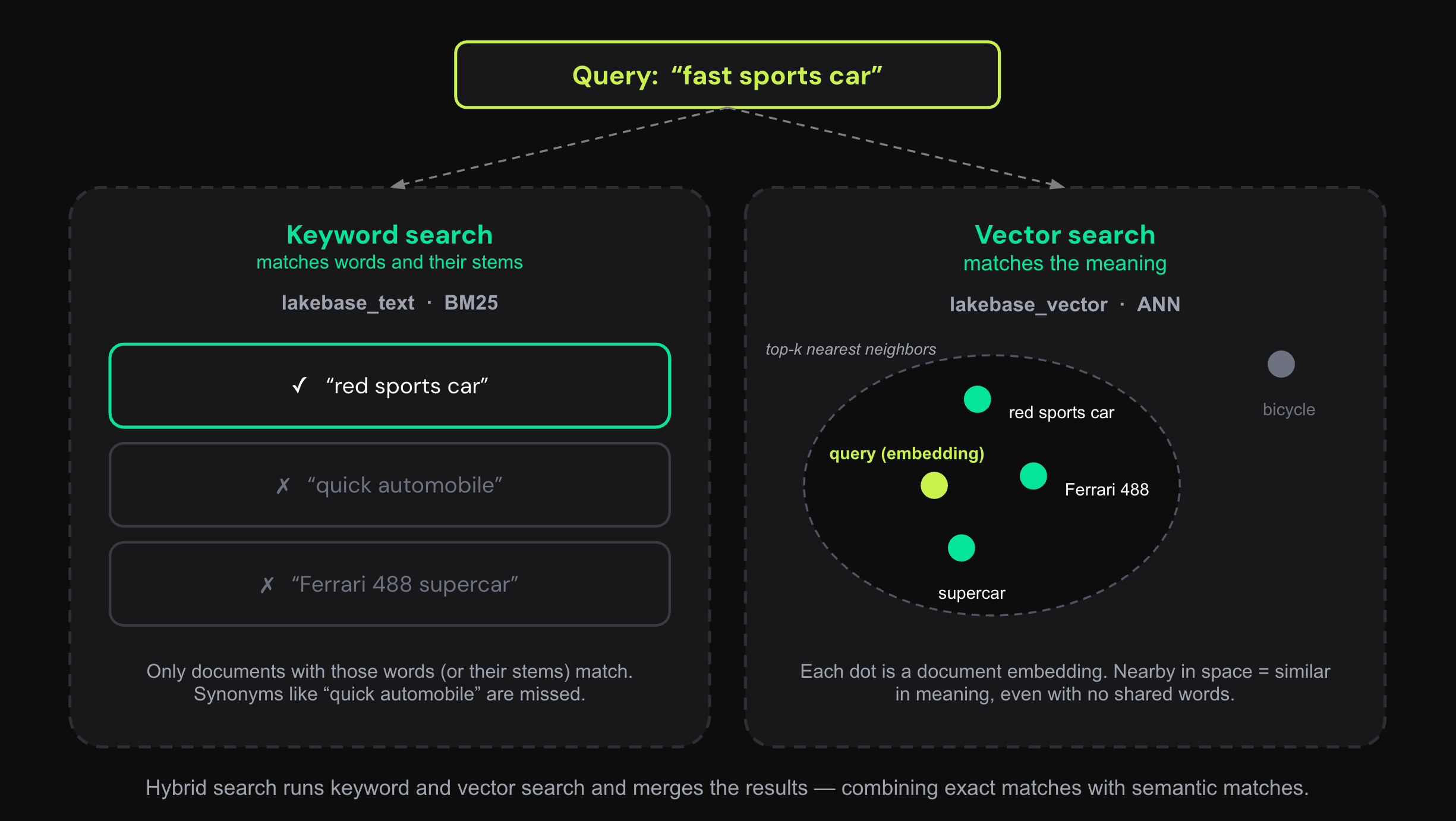
Lakebase Search gives you two complementary ways to search. Use either on its own, or combine them:
- Vector (semantic) search finds rows whose meaning is closest to your query, even when they share no words. You search with an embedding (a numeric vector from a model), and the
lakebase_annindex returns the nearest vectors by distance. Use it for natural-language questions, recommendations, and retrieval-augmented generation (RAG). - Keyword (full-text) search ranks rows by how well they match the exact terms in your query, using BM25 relevance scoring from the
lakebase_bm25index. Use it for names, codes, and exact-term lookups where wording matters. - Hybrid search combines vector and keyword results with fusion or reranking, so you get semantic and exact-term matches together. Use it when queries mix intent with specific terms, which covers most real-world search. The Get started guide shows how to combine results with Jev through Neon AI Gateway or RRF.
How it works
Lakebase Search is built on three Postgres extensions:
lakebase_vector: adds thelakebase_annindex type for vector similarity search. No migration frompgvectorrequired. The samevectortypes, distance operators, and query syntax work unchanged. Scales to over 1 billion vectors on a single index.lakebase_text: adds thelakebase_bm25index type for BM25 keyword search. No migration from Postgres full-text search required. Standardtsvectortypes and query operators work unchanged. Adds BM25 ranking and top-K pushdown that native GIN lacks.lakebase_tokenizer: adds configurable whole-word tokenization and Chinese, Japanese, and Korean (CJK) morphological analysis through Postgres's text-search dictionary interface. It produces standardtsvectorvalues that work with GIN andlakebase_bm25indexes.
Howlakebase_annscales
lakebase_ann is designed for the separated compute/storage architecture that powers Neon. Because the index lives in storage rather than in compute memory, it works naturally with Neon's scale-to-zero model: your vector index is available immediately after a cold start, with no warmup required. You only pay for compute when your database is actively serving requests. This holds for production workloads and for development or staging environments where the database sits idle most of the time.
It uses IVF (Inverted File) partitioning to divide the vector space into lists and searches only the relevant ones at query time, using sequential I/O that suits storage-backed systems. RaBitQ quantization compresses vectors 4–8x, keeping index size and build time down. The result:
- Scale to 1 billion+ vectors: a single
lakebase_annindex grows with your data without resharding or rebuilding - Faster index builds: compression reduces index size significantly, making builds 50–100x faster than HNSW
- Branching without index rebuilds: Neon branches copy-on-write; your search indexes are available instantly on every branch without re-indexing
- Scale-to-zero compatible: indexes survive cold starts without warmup; you don't pay for idle compute
Get started

Quickstart
Install lakebase_vector and lakebase_text, create a schema, insert documents with embeddings, and run your first searches
lakebase_vector reference
Index options, operator classes, and tuning reference for lakebase_vector
lakebase_text reference
BM25 operators, functions, fallback parameters, and prefilter reference for lakebase_text
lakebase_tokenizer reference
Whole-word and CJK tokenization, built-in language configurations, custom stop words, synonyms, and stemming
Need help?
Join our Discord Server to ask questions or see what others are doing with Neon. For paid plan support options, see Support.