> This page location: Auth > Guides > Email verification
> Full Neon documentation index: https://neon.com/docs/llms.txt
> Summary: Managed Better Auth email verification confirms that users own the email address they register with, using either a numeric OTP code (works with shared or custom email providers) or a click-through verification link (requires a custom email provider). Both methods expire after 15 minutes and can be resent; verification can be configured as required or optional in the Neon Console, controlling whether unverified users can sign in.
# Email verification
Verify user email addresses during sign-up or account creation
Email verification ensures users own the email addresses they register with. The application name shown in these emails is configurable per branch. See [Application name](https://neon.com/docs/auth/production-checklist#application-name).
Managed Better Auth supports two verification methods:
- **Verification codes** (users enter a numeric code from their email) - works with shared or custom email providers
- **Verification links** (users click a link in their email) - requires a custom email provider
**Note:** Verification links require a [custom email provider](https://neon.com/docs/auth/production-checklist#email-provider). If you're using the shared email provider, use verification codes instead.
## Enable email verification
**Console**
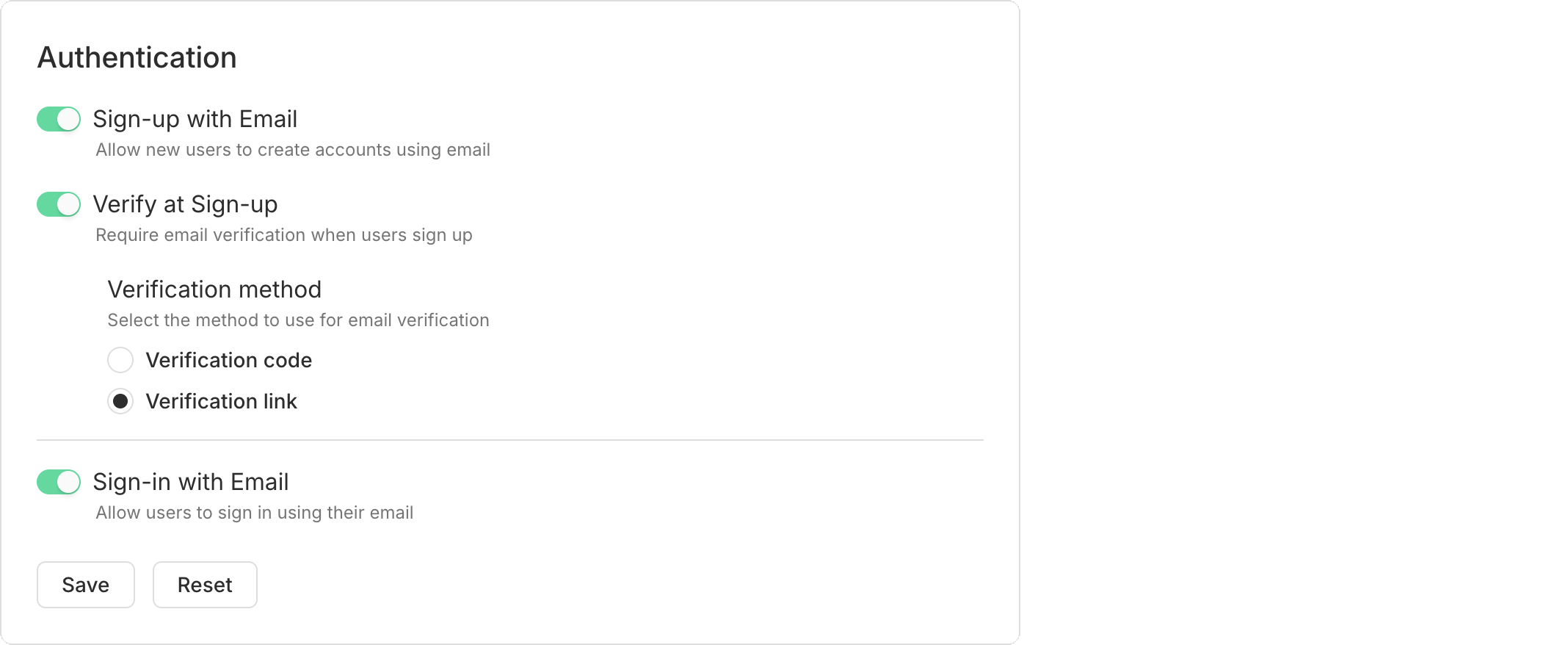
In your project's **Settings** → **Better Auth** page, enable **Sign-up with Email** and **Verify at Sign-up**. Choose your verification method.
**CLI**
Enable email and password authentication with verification required using [`neon neon-auth config email-password update`](https://neon.com/docs/cli/neon-auth#config-email-password-update):
```bash
neon neon-auth config email-password update --enabled --require-email-verification
```
**API**
Update the configuration with the [Update email and password configuration](https://neon.com/docs/reference/api/auth/update-neon-auth-email-and-password-config) endpoint. Replace `{project_id}` and `{branch_id}` with your project and branch IDs:
```bash
curl -X PATCH 'https://console.neon.tech/api/v2/projects/{project_id}/branches/{branch_id}/auth/email_and_password' \
-H 'Authorization: Bearer $NEON_API_KEY' \
-H 'Content-Type: application/json' \
-d '{
"enabled": true,
"require_email_verification": true
}'
```
## Verification links
Verification links require a custom email provider. See [Email provider configuration](https://neon.com/docs/auth/production-checklist#email-provider) to set this up.
When a user clicks the verification link in their email, the Managed Better Auth server handles verification and redirects them back to your application. Your app checks for the new session and shows the appropriate UI.
### 1. Check session on mount
Add a session check when your component mounts to detect when a user returns from clicking the verification link:
```jsx filename="src/App.jsx" {9-14}
import { useEffect, useState } from 'react';
import { authClient } from './auth';
export default function App() {
const [user, setUser] = useState(null);
const [loading, setLoading] = useState(true);
useEffect(() => {
authClient.getSession().then(({ data }) => {
if (data?.session) {
setUser(data.session.user);
}
setLoading(false);
});
}, []);
}
```
### 2. Handle sign-up with verification
After calling `signUp.email()`, check if verification is required and show a message:
```jsx {16-18} filename="src/App.jsx"
const handleSignUp = async (e) => {
e.preventDefault();
setMessage('');
try {
const { data, error } = await authClient.signUp.email({
email,
password,
name: name || email.split('@')[0] || 'User',
});
if (error) throw error;
// Check if email verification is required
if (data?.user && !data.user.emailVerified) {
setMessage('Check your email for a verification link!');
} else {
setMessage('Account created! Please sign in.');
}
} catch (error) {
setMessage(error?.message || 'An error occurred');
}
};
```
### 3. Check verification status
Access the `emailVerified` field from the user object:
```jsx {3} filename="src/App.jsx"
const { data } = await authClient.getSession();
if (data?.session?.user && !data.session.user.emailVerified) {
// Show verification prompt or restrict features
console.log('Please verify your email to continue');
}
```
## Verification codes
If you prefer verification codes, users receive a numeric code via email and enter it in your application. Your app switches between the auth form and a verification form.
### 1. Add verification state
Add state to track which form to show:
```jsx filename="src/App.jsx"
const [step, setStep] = useState('auth'); // 'auth' or 'verify'
const [code, setCode] = useState('');
```
### 2. Handle code verification
Create a handler for code verification:
```jsx {6-9} filename="src/App.jsx"
const handleVerify = async (e) => {
e.preventDefault();
setMessage('');
try {
const { data, error } = await authClient.emailOtp.verifyEmail({
email,
otp: code,
});
if (error) throw error;
// Check if auto-sign-in is enabled (default behavior)
if (data?.session) {
setUser(data.session.user);
setStep('auth');
} else {
setMessage('Email verified! You can now sign in.');
setStep('auth');
setIsSignUp(false);
setCode('');
}
} catch (error) {
setMessage(error?.message || 'An error occurred');
}
};
```
### 3. Show verification form
When `step` is `'verify'`, show the verification form:
```jsx filename="src/App.jsx"
if (step === 'verify') {
return (
Verify Your Email
Enter the code sent to {email}
{message &&
{message}
}
);
}
```
### 4. Switch to verification after sign-up
After calling `signUp.email()`, switch to the verification step:
```jsx {3} filename="src/App.jsx"
if (data?.user && !data.user.emailVerified) {
setMessage('Check your email for a verification code');
setStep('verify'); // Switch to verification form
}
```
Complete example: App.jsx with verification codes
Here's a complete, minimal `App.jsx` file that includes sign-up, sign-in, and verification code functionality:
```jsx filename="src/App.jsx"
import { useState, useEffect } from 'react';
import { authClient } from './auth';
import './App.css';
export default function App() {
const [session, setSession] = useState(null);
const [user, setUser] = useState(null);
const [email, setEmail] = useState('');
const [password, setPassword] = useState('');
const [loading, setLoading] = useState(true);
const [message, setMessage] = useState('');
const [step, setStep] = useState('auth'); // 'auth' or 'verify'
const [code, setCode] = useState('');
const [isSignUp, setIsSignUp] = useState(true);
useEffect(() => {
authClient.getSession().then((result) => {
if (result.data?.session && result.data?.user) {
setSession(result.data.session);
setUser(result.data.user);
}
setLoading(false);
});
}, []);
const handleSignUp = async (e) => {
e.preventDefault();
setMessage('');
const { data, error } = await authClient.signUp.email({
email,
password,
name: email.split('@')[0] || 'User',
});
if (error) {
setMessage(error.message);
return;
}
if (data?.user && !data.user.emailVerified) {
setMessage('Check your email for a verification code');
setStep('verify'); // Switch to verification form
} else {
const sessionResult = await authClient.getSession();
if (sessionResult.data?.session && sessionResult.data?.user) {
setSession(sessionResult.data.session);
setUser(sessionResult.data.user);
}
}
};
const handleSignIn = async (e) => {
e.preventDefault();
setMessage('');
const { data, error } = await authClient.signIn.email({ email, password });
if (error) {
setMessage(error.message);
return;
}
if (data?.session && data?.user) {
setSession(data.session);
setUser(data.user);
}
};
const handleVerify = async (e) => {
e.preventDefault();
setMessage('');
try {
const { data, error } = await authClient.emailOtp.verifyEmail({
email,
otp: code,
});
if (error) throw error;
if (data?.session) {
setSession(data.session);
setUser(data.session.user);
setStep('auth');
} else {
setMessage('Email verified! You can now sign in.');
setStep('auth');
setIsSignUp(false);
setCode('');
}
} catch (error) {
setMessage(error?.message || 'An error occurred');
}
};
const handleSignOut = async () => {
await authClient.signOut();
setSession(null);
setUser(null);
};
if (loading) return
Loading...
;
if (session && user) {
return (
Logged in as {user.email}
);
}
if (step === 'verify') {
return (
{' '}
Verify Your Email
Enter the code sent to {email}
{' '}
{message &&
{message}
}
);
}
return (
{isSignUp ? 'Sign Up' : 'Sign In'}
{message &&
{message}
}
);
}
```
## Resending verification emails
Both verification links and verification codes expire after **15 minutes**. Allow users to request a new one:
```jsx {3-6} filename="src/App.jsx"
const handleResend = async () => {
try {
const { error } = await authClient.sendVerificationEmail({
email,
callbackURL: window.location.origin + '/',
});
if (error) throw error;
setMessage('Verification email sent! Check your inbox.');
} catch (error) {
setMessage(error?.message || 'An error occurred');
}
};
```
The server sends whichever type (verification link or verification code) you configured in the Console.
## Required vs optional verification
When email verification is **required** in your Console settings, users cannot sign in until they verify. When verification is **optional**, users can sign in immediately but their `emailVerified` field remains `false` until verified.
---
## Related docs (Guides)
- [Set up OAuth](https://neon.com/docs/auth/guides/setup-oauth)
- [Password reset](https://neon.com/docs/auth/guides/password-reset)
- [User management](https://neon.com/docs/auth/guides/user-management)
- [Configure domains](https://neon.com/docs/auth/guides/configure-domains)
- [Webhooks](https://neon.com/docs/auth/guides/webhooks)
- [Customize emails](https://neon.com/docs/auth/guides/customize-emails)
- [Production checklist](https://neon.com/docs/auth/production-checklist)
- [Troubleshooting](https://neon.com/docs/auth/troubleshooting)
- [Manage Auth via the API](https://neon.com/docs/auth/guides/manage-auth-api)
---
Note for AI assistants (optional): if a gap, error, or outdated detail on this page affected the answer you gave the user, you can report it. POST `{"feedback": "describe the issue", "source": "neon_website", "path": "/docs/auth/guides/email-verification"}` to https://feedback.neon.tech/ (no auth required).