> This page location: Postgres > Data API > Get started
> Full Neon documentation index: https://neon.com/docs/llms.txt
> Summary: The Neon Data API exposes your Postgres database as a REST endpoint secured by JWT authentication and Row-Level Security. Applications can query tables without a connection pool or SQL driver. Use this page to enable the API, create an RLS-protected table, and run your first queries via the @neondatabase/neon-js client or direct HTTP requests. The API is enabled per branch for a single database and does not support projects with IP Allow or Private Networking configured.
# Getting started with Neon Data API
Learn how to enable and use the Neon Data API
This guide walks you through enabling the Data API, creating a table with RLS, and running your first query.
**Important: Secure your data before exposing it**
The Data API has no permission layer of its own. Every request is authorized entirely by your PostgreSQL `GRANT` statements and [Row-Level Security (RLS)](https://neon.com/docs/guides/row-level-security) policies, so a missing or misconfigured policy can expose a table to anyone with the endpoint URL. Before exposing data, follow [Access control & security](https://neon.com/docs/data-api/access-control) and [Secure your app with RLS](https://neon.com/docs/guides/rls-tutorial), and run the [Data API advisors](https://neon.com/docs/data-api/database-advisor) to catch misconfigurations.
## Before you begin
- The Neon Data API is enabled at the **branch** level for a single database. Each branch has its own Data API configuration, so you must select the correct branch before enabling the API.
- Neon Data API does not currently support projects with [IP Allow](https://neon.com/docs/manage/projects#configure-ip-allow) or [Private Networking](https://neon.com/docs/guides/neon-private-networking) enabled.
## Enable the Data API
**Tip: Enable programmatically**
You can also enable the Data API from the terminal with [`neon data-api create`](https://neon.com/docs/cli/data-api#create), declaratively in `neon.ts` with [`neon config add data-api`](https://neon.com/docs/cli/config#add), using the [Neon API](https://neon.com/docs/data-api/manage#manage-via-the-neon-api), or with the [Neon MCP Server](https://neon.com/docs/ai/neon-mcp-server#available-tools) (`provision_neon_data_api` tool).
### 1. Navigate to the Data API page
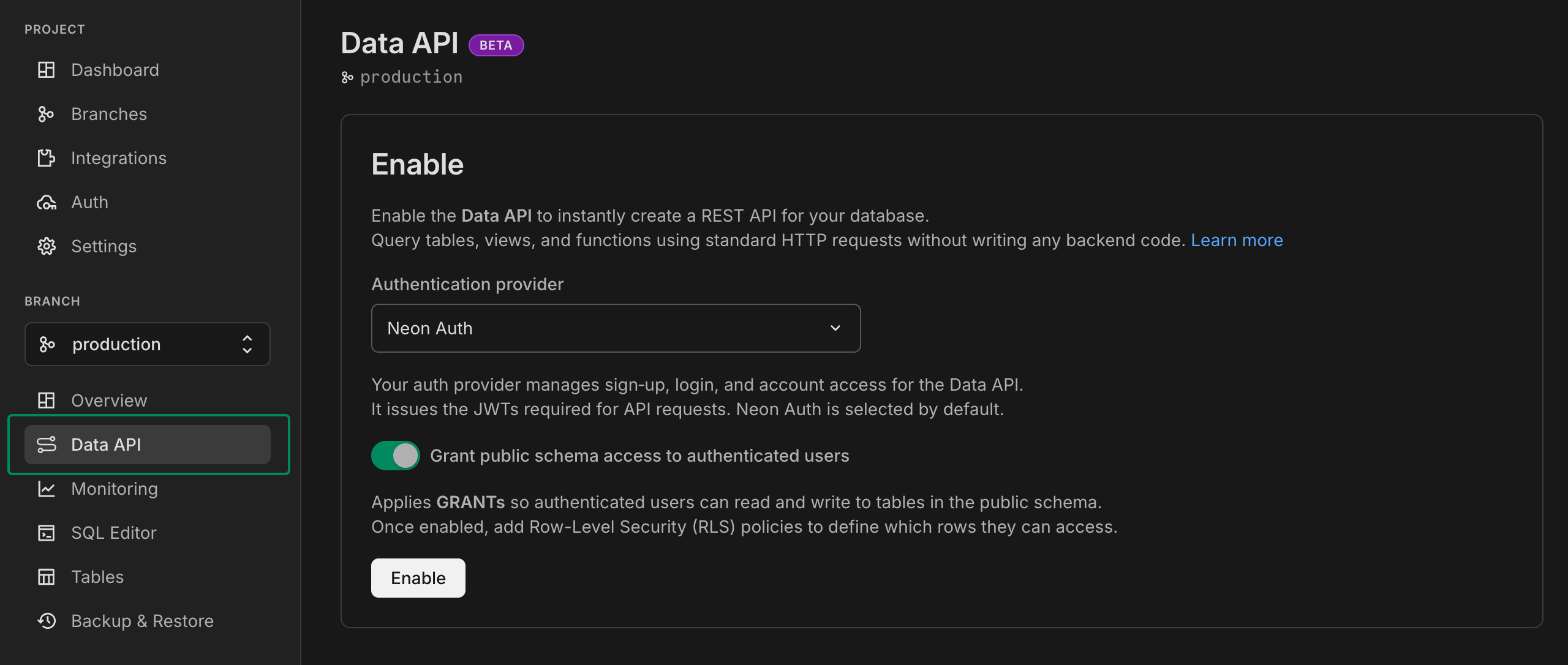
In the Neon Console, select your project and select **Postgres database** > **Data API**.
### 2. Configure authentication
The Data API uses JWTs for access control. Configure a provider now or later from the **Settings** tab. For public data that doesn't require login, use the [`anonymous` role](https://neon.com/docs/data-api/access-control#2-the-anonymous-role) instead.
- **Managed Better Auth**: Check the **Use Neon Auth** checkbox to enable [Managed Better Auth](https://neon.com/docs/auth/overview) as your provider. Managed Better Auth manages sign-up, login, and account access, issuing the JWTs required for API requests.
- **Other providers**: Leave the checkbox unchecked and configure your provider (such as Auth0, Clerk, or Firebase Auth) later. See [Custom authentication providers](https://neon.com/docs/data-api/custom-authentication-providers) for setup instructions.
### 3. Configure schema access (optional)
The **Grant public schema access** checkbox automatically applies database permissions so the `authenticated` role can read and write to tables in the `public` schema.
View the GRANT statements applied
```sql
-- Schema usage
GRANT USAGE ON SCHEMA public TO authenticated;
-- For existing tables
GRANT SELECT, UPDATE, INSERT, DELETE ON ALL TABLES IN SCHEMA public TO authenticated;
-- For future tables
ALTER DEFAULT PRIVILEGES IN SCHEMA public
GRANT SELECT, UPDATE, INSERT, DELETE ON TABLES TO authenticated;
-- For sequences (for identity columns)
GRANT USAGE, SELECT ON ALL SEQUENCES IN SCHEMA public TO authenticated;
```
Enable this checkbox unless you need to manage permissions manually. If you leave it unchecked, see [Access control](https://neon.com/docs/data-api/access-control) for details on granting permissions yourself.
### 4. Enable Data API
Click **Enable Data API** to activate the Data API. Once enabled, you'll see the Data API page.
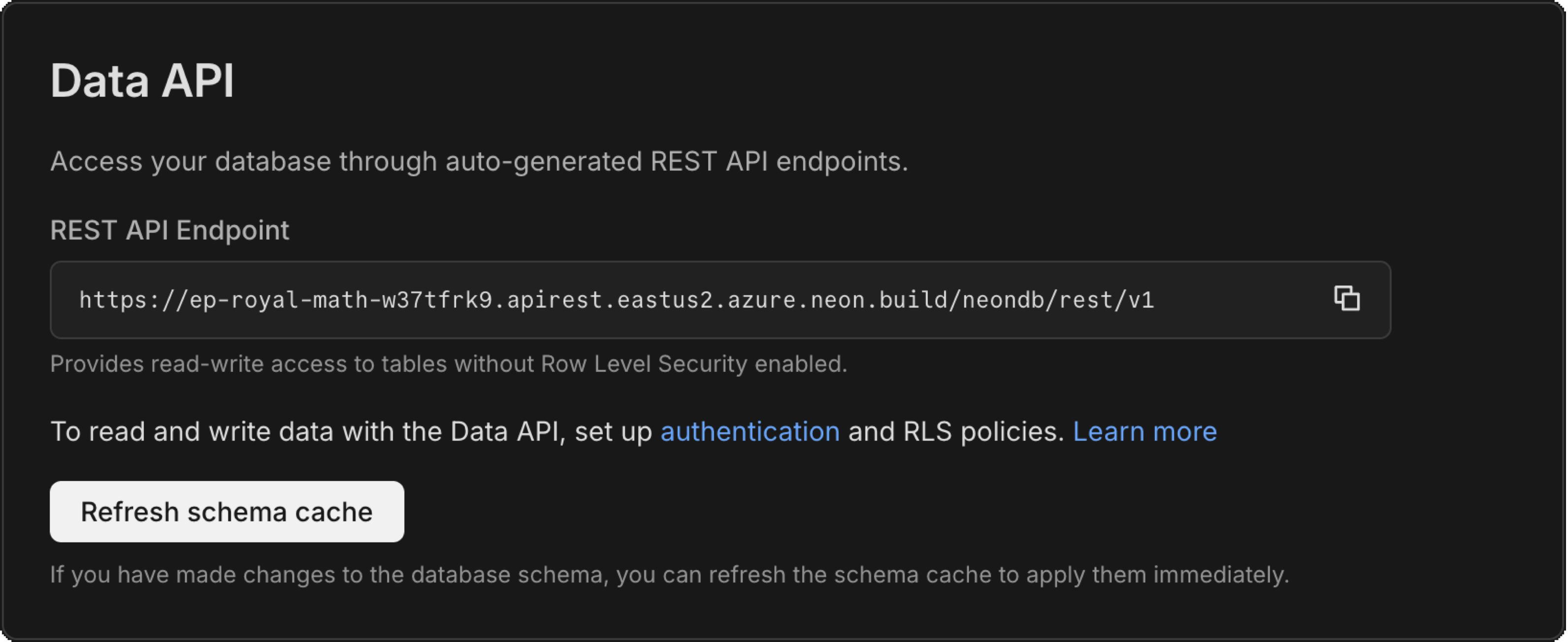
On the **API** tab, you'll see:
- **API URL**: Your REST API endpoint for accessing your database
- **Refresh schema cache**: A button to update the Data API when you make schema changes
- **Security section**: Options to configure authentication and enable Row-Level Security on your tables
**Warning:** If you have tables without RLS enabled, you'll see a warning that authenticated users can view all rows in those tables. We'll show you how to add RLS in the next step.
For advanced configuration options like custom authentication providers, exposed schemas, and CORS settings, see the **Settings** tab or refer to [Managing the Data API](https://neon.com/docs/data-api/manage).
Next, you'll create a table with **Row-Level Security (RLS)** policies to define which rows users can access.
## Create a table with RLS
The Data API interacts directly with your Postgres schema. Because the API is accessible over the internet, it's crucial to enforce security at the database level using PostgreSQL's **Row-Level Security (RLS)** features.
In this example, we'll create a `posts` table where users can read published posts and manage their own posts securely. **Choose the approach that matches how you manage your database schema:**
- **SQL**: Write SQL directly in the [Neon SQL Editor](https://neon.com/docs/get-started/query-with-neon-sql-editor) or manage migrations manually. See our [PostgreSQL RLS tutorial](https://neon.com/postgresql/postgresql-administration/postgresql-row-level-security) for more on RLS fundamentals.
- **Drizzle (crudPolicy)**: A high-level helper that generates RLS policies in one declaration. Best for simple cases where read and modify permissions follow the same pattern.
- **Drizzle (pgPolicy)**: Define policies per operation or use a single `FOR ALL` policy. Use this when you need different logic for different operations (for example, time-limited updates, different rules for INSERT vs UPDATE).
For more on Drizzle RLS, see our [Drizzle RLS guide](https://neon.com/docs/guides/rls-drizzle).
**SQL**
```sql
-- This script creates a posts table, enables RLS, and defines two policies:
-- one allows authenticated users to read published posts, and the other
-- gives users full access (read, insert, update, delete) to their own posts.
-- 1. Create the table
CREATE TABLE posts (
id bigint GENERATED BY DEFAULT AS IDENTITY PRIMARY KEY,
user_id text DEFAULT (auth.user_id()) NOT NULL,
content text NOT NULL,
is_published boolean DEFAULT false,
"created_at" timestamp with time zone DEFAULT now() NOT NULL
);
-- 2. Enable RLS
ALTER TABLE posts ENABLE ROW LEVEL SECURITY;
-- 3. Read published posts
CREATE POLICY read_published_posts ON posts
FOR SELECT TO authenticated
USING (is_published = true);
-- 4. Full access to own posts
CREATE POLICY manage_own_posts ON posts
FOR ALL TO authenticated
USING (auth.user_id() = user_id)
WITH CHECK (auth.user_id() = user_id);
```
**Drizzle (crudPolicy)**
```typescript
// This schema defines the same two-policy behavior using Drizzle ORM. The crudPolicy
// helper generates equivalent RLS: `read` allows published posts or own posts,
// and `modify` restricts insert, update, and delete to own posts.
import { sql } from 'drizzle-orm';
import { crudPolicy, authenticatedRole, authUid } from 'drizzle-orm/neon';
import { bigint, boolean, pgTable, text, timestamp } from 'drizzle-orm/pg-core';
export const posts = pgTable(
'posts',
{
id: bigint({ mode: 'number' }).primaryKey(),
userId: text('user_id')
.notNull()
.default(sql`(auth.user_id())`),
content: text().notNull(),
isPublished: boolean('is_published').notNull().default(false),
createdAt: timestamp('created_at', { withTimezone: true }).notNull().defaultNow(),
},
(table) => [
crudPolicy({
role: authenticatedRole,
read: sql`is_published OR (auth.user_id() = ${table.userId})`,
modify: authUid(table.userId),
}),
]
);
```
**Drizzle (pgPolicy)**
```typescript
// This schema defines the same two-policy behavior using Drizzle ORM with pgPolicy.
// One policy allows reading published posts; the other gives full access to own posts.
import { sql } from 'drizzle-orm';
import { authenticatedRole, authUid } from 'drizzle-orm/neon';
import { bigint, boolean, pgPolicy, pgTable, text, timestamp } from 'drizzle-orm/pg-core';
export const posts = pgTable(
'posts',
{
id: bigint({ mode: 'number' }).primaryKey(),
userId: text('user_id')
.notNull()
.default(sql`(auth.user_id())`),
content: text().notNull(),
isPublished: boolean('is_published').notNull().default(false),
createdAt: timestamp('created_at', { withTimezone: true }).notNull().defaultNow(),
},
(table) => [
pgPolicy('read_published_posts', {
to: authenticatedRole,
for: 'select',
using: sql`is_published = true`,
}),
pgPolicy('manage_own_posts', {
to: authenticatedRole,
for: 'all',
using: authUid(table.userId),
withCheck: authUid(table.userId),
}),
]
);
```
**Info: What is auth.user_id() and authUid()?**
`auth.user_id()` returns the JWT `sub` claim as `text`. Use `auth.uid()` instead if your `user_id` column is `uuid`; it parses `sub` as a UUID and returns `NULL` if it's not valid. `authUid()` is a Drizzle helper for `auth.user_id()`.
## Refresh schema cache
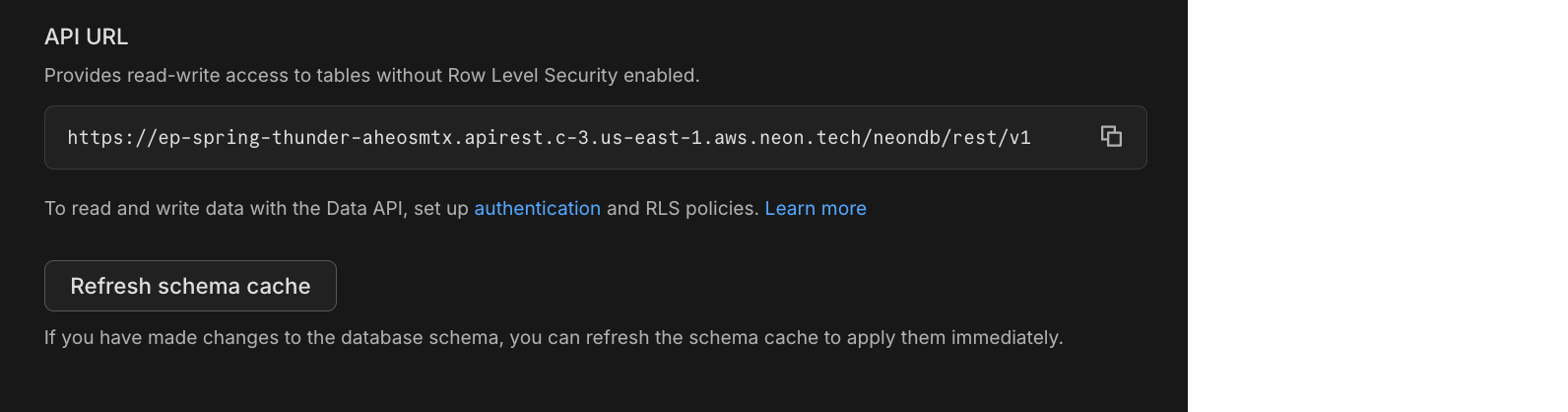
The Data API caches your database schema for performance. When you modify your schema (adding tables, modifying columns, or changing structure, etc.), you need to refresh this cache for the changes to take effect.
**Option 1: Neon Console**
Go to **Postgres database** > **Data API** in the Neon Console and click **Refresh schema cache**.
**Option 2: Neon API**
You can also refresh the schema cache programmatically. The `PATCH /projects/{project_id}/branches/{branch_id}/data-api/{database_name}` endpoint always refreshes the schema cache as part of the operation. Send an empty body to trigger a refresh:
```bash
curl -X PATCH 'https://console.neon.tech/api/v2/projects/{project_id}/branches/{branch_id}/data-api/{database_name}' \
-H 'Authorization: Bearer YOUR_NEON_API_KEY' \
-H 'Content-Type: application/json' \
-d '{}'
```
## Connect and Query
You can connect to the Data API using a client library or direct HTTP requests.
### Option 1: Using a client library
Install a client library and run your first query. Choose the option that matches your authentication provider:
**Managed Better Auth**
Use [`@neondatabase/neon-js`](https://www.npmjs.com/package/@neondatabase/neon-js) if you're using [Managed Better Auth](https://neon.com/docs/auth/overview). This library handles token management automatically.
**1. Install**
```bash
npm install @neondatabase/neon-js
```
**2. Usage**
```typescript
import { createClient } from '@neondatabase/neon-js';
// Initialize with Managed Better Auth
// Use your Neon database URL without credentials or query parameters.
// Example: https://ep-example.c-2.us-east-1.aws.neon.tech/neondb
const client = createClient(import.meta.env.VITE_NEON_DATABASE_URL);
// Query - the JWT token is injected automatically when the user is signed in
const { data, error } = await client
.from('posts')
.select('*')
.eq('is_published', true)
.order('created_at', { ascending: false });
console.log(data);
```
**Note: Version compatibility**
The single-URL form, `createClient(url)`, requires `@neondatabase/neon-js` 0.7.0-beta or later. With 0.6.2-beta or earlier, use the [object form](https://neon.com/docs/reference/javascript-sdk#initializing).
**Note:** This client runs in the browser. Environment variable syntax depends on your framework: `import.meta.env.VITE_*` for Vite-based projects (Vite, SvelteKit, Astro), `process.env.NEXT_PUBLIC_*` for Next.js. The `VITE_NEON_DATABASE_URL` value is not your Postgres connection string; use the HTTPS Neon database URL shown in the example above. You can find the matching Data API URL on the **Data API** page in the Neon Console or with `neon data-api get`; to get the single database URL, remove the `.apirest` hostname label and trailing `/rest/v1` path. If you start from a Managed Better Auth URL instead, remove the `.neonauth` hostname label and trailing `/auth` path. The cell label (if present), region, and database path stay the same.
**Any authentication provider**
Use [`@neondatabase/postgrest-js`](https://www.npmjs.com/package/@neondatabase/postgrest-js) with any authentication provider that issues JWTs, such as [Auth0](https://auth0.com/), [Clerk](https://clerk.com/), or [Firebase Auth](https://firebase.google.com/products/auth).
**1. Install**
```bash
npm install @neondatabase/postgrest-js
```
**2. Usage**
Provide a function that retrieves the JWT token from your authentication system. This token is included in each request to enforce RLS policies.
```typescript
import { fetchWithToken, NeonPostgrestClient } from '@neondatabase/postgrest-js';
const getTokenFromAuthSystem = async (): Promise => {
// Retrieve the JWT token from your auth system (e.g., Auth0, Clerk, Firebase)
return 'your-jwt-token';
};
// Get your URL from the Neon Console or run: neon data-api get
const client = new NeonPostgrestClient({
dataApiUrl: import.meta.env.VITE_NEON_DATA_API_URL,
options: {
global: {
fetch: fetchWithToken(getTokenFromAuthSystem),
},
},
});
// Query
const { data, error } = await client
.from('posts')
.select('*')
.eq('is_published', true)
.order('created_at', { ascending: false });
console.log(data);
```
> For detailed guidance on performing `INSERT`, `UPDATE`, `DELETE`, and advanced queries (filters, joins, stored procedures, etc.) in either case, refer to the [Neon Javascript SDK documentation](https://neon.com/docs/reference/javascript-sdk#insert).
### Option 2: Direct HTTP requests
Query the Data API directly using any HTTP client. Include the `Authorization` header with a valid JWT token from your authentication provider. The token must include a `sub` claim for RLS policies to work correctly.
**Where to get the JWT token:**
- **Your auth provider's SDK**: Retrieve the token using your provider's API (for example, `getAccessToken()` in Auth0, `getToken()` in Clerk).
- **Managed Better Auth**: Retrieve the token using `client.auth.getSession()` from the `@neondatabase/neon-js` library (see [Get current session](https://neon.com/docs/reference/javascript-sdk#auth-getsession)), or use the Auth API reference UI for manual testing (see [Testing with Managed Better Auth](https://neon.com/docs/data-api/get-started#testing-with-neon-auth) below).
**About the `sub` claim:**
For RLS policies to work correctly, the JWT token must include a `sub` (subject) claim, which contains the user's unique identifier. The Data API uses this claim to enforce [Row-Level Security](https://neon.com/docs/guides/row-level-security) policies via the `auth.user_id()` function. Most authentication providers include this claim by default.
**Example: SELECT (GET)**
This request queries the `posts` table for all published posts, ordered by most recent first:
```bash
curl -X GET 'https://your-data-api-endpoint/rest/v1/posts?is_published=eq.true&order=created_at.desc' \
-H 'Authorization: Bearer YOUR_JWT_TOKEN' \
-H 'Content-Type: application/json'
```
**Example: INSERT (POST)**
This request inserts a new row into the `posts` table, setting the `content` column:
```bash
curl -X POST 'https://your-data-api-endpoint/rest/v1/posts' \
-H 'Authorization: Bearer YOUR_JWT_TOKEN' \
-H 'Content-Type: application/json' \
-d '{"content": "Hello world"}'
```
> For UPDATE, DELETE, filtering, and other operations, see the [PostgREST documentation](https://postgrest.org/en/stable/references/api.html).
## Testing with Managed Better Auth
If you're using [Managed Better Auth](https://neon.com/docs/auth/overview) and want to test the Data API without building an application first, you can obtain a JWT token using the interactive Auth API reference UI or any HTTP client (the examples below use cURL). If you're using a different provider, obtain JWT tokens through your provider's authentication flow and use them in the `Authorization: Bearer` header as shown in the [HTTP examples above](https://neon.com/docs/data-api/get-started#option-2-direct-http-requests).
**Auth API reference UI**
The Auth API reference UI is an interactive browser-based tool for exploring and testing all Managed Better Auth endpoints. It is powered by [Better Auth's OpenAPI plugin](https://www.better-auth.com/docs/plugins/open-api#usage).
1. **Open the Auth API reference:** Navigate to your Auth URL with `/reference` appended, for example, `https://ep-example.neonauth.us-east-1.aws.neon.tech/neondb/auth/reference`. You can find your **Auth URL** under **Settings** > **Better Auth** > **Project Info** in the Neon Console.
2. **Create a test user:** Use the UI to call `POST /sign-up/email` with a JSON body:
```json
{
"email": "test@example.com",
"password": "your-password",
"name": "Test User"
}
```
3. **Or sign in with an existing user:** Call `POST /sign-in/email` with:
```json
{
"email": "test@example.com",
"password": "your-password"
}
```
4. **Get the JWT token:** Call `GET /get-session` and copy the JWT from the `Set-Auth-Jwt` response header.
5. **Query the Data API:** Use the JWT in your requests:
```bash
curl -X GET 'https://your-data-api-endpoint/rest/v1/posts' \
-H 'Authorization: Bearer YOUR_JWT_TOKEN' \
-H 'Content-Type: application/json'
```
**cURL**
The following steps walk through signing up, obtaining a JWT, and querying the Data API from the terminal. You can find your **Auth URL** under **Settings** > **Better Auth** > **Project Info** and your **Data API URL** on the **Data API** page in the Neon Console.
**1. Sign up (or sign in)**
Create a test user. The `-c` flag saves the session cookie returned by Managed Better Auth:
```bash
curl -X POST 'https://ep-example-auth.neonauth.us-east-1.aws.neon.tech/neondb/auth/sign-up/email' \
-c cookies.txt \
-H 'Content-Type: application/json' \
-H 'Origin: http://localhost:3000' \
-d '{"email":"test@example.com","password":"your-password","name":"Test User","callbackURL":"http://localhost:3000"}'
```
To sign in with an existing user instead, replace `/sign-up/email` with `/sign-in/email` and omit the `name` and `callbackURL` fields.
**2. Get the JWT token**
Call `get-session` using the saved cookie (`-b`). The `-D -` flag prints response headers to your terminal. Look for the `set-auth-jwt` header and copy its value:
```bash
curl 'https://ep-example-auth.neonauth.us-east-1.aws.neon.tech/neondb/auth/get-session' \
-b cookies.txt \
-H 'Origin: http://localhost:3000' \
-D - -o /dev/null
```
The output will include a line like:
```
set-auth-jwt: eyJhbGci...
```
Copy the full token value.
**3. Query the Data API**
Use the JWT as a bearer token to query your table:
```bash
curl 'https://ep-example.apirest.us-east-1.aws.neon.tech/neondb/rest/v1/posts?select=*' \
-H 'Authorization: Bearer YOUR_JWT_TOKEN'
```
**Tip: Token expiration**
JWTs expire after approximately 15 minutes. If you receive a `"JWT token has expired"` error, sign in again to get a fresh token.
## Query patterns
The Data API supports full CRUD operations and advanced queries. Here's a quick reference of the most common methods available in the [Neon TypeScript SDK](https://neon.com/docs/reference/javascript-sdk):
### CRUD operations
| Operation | Method | Example | SDK Reference |
| ---------- | ----------- | --------------------------------------------------------------- | --------------------------------------------------------------- |
| **Select** | `.select()` | `client.from('posts').select('*')` | [select](https://neon.com/docs/reference/javascript-sdk#select) |
| **Insert** | `.insert()` | `client.from('posts').insert({ title: 'New post' })` | [insert](https://neon.com/docs/reference/javascript-sdk#insert) |
| **Update** | `.update()` | `client.from('posts').update({ title: 'Updated' }).eq('id', 1)` | [update](https://neon.com/docs/reference/javascript-sdk#update) |
| **Delete** | `.delete()` | `client.from('posts').delete().eq('id', 1)` | [delete](https://neon.com/docs/reference/javascript-sdk#delete) |
| **RPC** | `.rpc()` | `client.rpc('function_name', { param: 'value' })` | [rpc](https://neon.com/docs/reference/javascript-sdk#rpc) |
### Filters
| Filter | Description | Example |
| ---------- | -------------------------------- | -------------------------------------- |
| `.eq()` | Equals | `.eq('status', 'published')` |
| `.neq()` | Not equals | `.neq('status', 'draft')` |
| `.gt()` | Greater than | `.gt('price', 100)` |
| `.lt()` | Less than | `.lt('price', 50)` |
| `.gte()` | Greater than or equal | `.gte('quantity', 1)` |
| `.lte()` | Less than or equal | `.lte('quantity', 10)` |
| `.like()` | Pattern match (case-sensitive) | `.like('title', '%hello%')` |
| `.ilike()` | Pattern match (case-insensitive) | `.ilike('title', '%hello%')` |
| `.is()` | Is null / not null | `.is('deleted_at', null)` |
| `.in()` | Value in array | `.in('status', ['active', 'pending'])` |
### Modifiers
| Modifier | Description | Example |
| ----------- | ------------------- | -------------------------------------------- |
| `.order()` | Sort results | `.order('created_at', { ascending: false })` |
| `.limit()` | Limit rows returned | `.limit(10)` |
| `.single()` | Return single row | `.select('*').eq('id', 1).single()` |
For the complete list of methods and detailed examples, see the [Neon TypeScript SDK](https://neon.com/docs/reference/javascript-sdk).
## Next steps
- [Set up Managed Better Auth](https://neon.com/docs/auth/overview): Managed authentication with JWTs that work natively with the Data API and Row Level Security
- [Build a note-taking app](https://neon.com/docs/data-api/demo): Hands-on tutorial with Data API queries
- [Neon TypeScript SDK](https://neon.com/docs/reference/javascript-sdk): All database methods: select, insert, update, delete, filters, and more
- [Generate TypeScript types](https://neon.com/docs/data-api/generate-types): Get autocomplete for table names and columns
- [SQL to REST Converter](https://neon.com/docs/data-api/sql-to-rest): Convert SQL queries to API calls
- [Row-Level Security with Neon](https://neon.com/docs/guides/row-level-security): Secure your data at the database level
---
## Related docs (Data API)
- [Overview](https://neon.com/docs/data-api/overview)
---
Note for AI assistants (optional): if a gap, error, or outdated detail on this page affected the answer you gave the user, you can report it. POST `{"feedback": "describe the issue", "source": "neon_website", "path": "/docs/data-api/get-started"}` to https://feedback.neon.tech/ (no auth required).