> This page location: Migrate to Neon > Migrate from > Turso
> Full Neon documentation index: https://neon.com/docs/llms.txt
> Summary: Migration guide for moving a Turso (libSQL/SQLite) database to Lakebase Postgres using pgloader. Dumps the Turso database to a local SQLite file with the Turso CLI, then loads it into Neon where pgloader converts SQLite type affinities to Postgres types. Use this guide when the source is Turso or SQLite; it also covers swapping Turso drivers for the Neon serverless driver, translating `?` placeholders to `$1` parameters, adapting dialect differences like LIKE vs ILIKE, and verifying sequences after migration. Neon's Free plan supports up to 1 GB; larger Turso databases require a paid Neon plan.
# Migrate from Turso to Lakebase Postgres
This guide describes how to migrate your Turso database to Lakebase Postgres using [pgloader](https://pgloader.readthedocs.io/en/latest/intro.html).
`pgloader` is an open-source data loading and migration tool that efficiently transfers data from various sources (like CSV, MySQL, SQLite, MS SQL, etc.) into Postgres, handling schema and data transformations on the fly. Since Turso databases are SQLite-compatible, you can dump them to a local SQLite file and then use `pgloader` to migrate that file to Lakebase Postgres.
## Prerequisites
Before you begin, ensure you have the following:
- A Neon account and a project. If you don't have one, see [Sign up](https://neon.com/docs/get-started/signing-up).
- A database created in your Neon project. For instructions, see [Create a database](https://neon.com/docs/manage/databases#create-a-database).
- The [Turso CLI](https://docs.turso.tech/cli/introduction) installed. You'll use it to export your database.
- The `sqlite3` command-line tool, typically pre-installed on macOS and Linux.
- Neon's Free plan supports 1 GB of data. If your data size is more than 1 GB, you'll need to upgrade to one of Neon's paid plans. See [Neon plans](https://neon.com/docs/introduction/plans) for more information.
A review of the [pgloader SQLite to Postgres Guide](https://pgloader.readthedocs.io/en/latest/ref/sqlite.html) is also recommended. It provides a comprehensive overview of `pgloader`'s capabilities and type mappings, which will be helpful for understanding the migration process.
## Understanding SQLite and Postgres data types
Before migrating from Turso to Postgres, it's helpful to understand a key difference in how they handle data types. Turso, built on SQLite, uses a flexible typing system called "type affinity". You can store any type of data in any column, regardless of its declared type. Postgres uses a strict, static typing system. Data inserted into a column must precisely match the column's declared data type.
When converting a database, SQLite's type affinities are mapped to appropriate Postgres types. Here is a summary of the common mappings:
| Data Type Category | SQLite | PostgreSQL | Key Differences & Notes |
| :------------------------------ | :------------------------------------ | :---------------------------------------------------------------------------------- | :------------------------------------------------------------------------------------------------------------------------------------------------------------------------------------------------------------------------------------------------------------------------------------------------------------------------ |
| **Integer** | `INTEGER` | `SMALLINT` (2 bytes)
`INTEGER` (4 bytes)
`BIGINT` (8 bytes) | SQLite's `INTEGER` is a flexible-size signed integer, storing values in 1, 2, 3, 4, 6, or 8 bytes depending on the magnitude of the value. PostgreSQL offers fixed-size integers for more granular control over storage and performance. |
| **Auto-incrementing Integer** | `INTEGER PRIMARY KEY` | `SMALLSERIAL` (2 bytes)
`SERIAL` (4 bytes)
`BIGSERIAL` (8 bytes) | In SQLite, declaring a column as `INTEGER PRIMARY KEY` automatically makes it an alias for the `rowid` and thus auto-incrementing. PostgreSQL provides the `SERIAL` pseudo-types, which create a sequence object to generate unique identifiers. |
| **Floating-Point** | `REAL` | `REAL` (4 bytes)
`DOUBLE PRECISION` (8 bytes) | SQLite's `REAL` is an 8-byte IEEE floating-point number. PostgreSQL offers both single-precision (`REAL`) and double-precision (`DOUBLE PRECISION`) floating-point numbers. |
| **Arbitrary Precision Numeric** | `NUMERIC` | `NUMERIC(precision, scale)`
`DECIMAL(precision, scale)` | SQLite's `NUMERIC` affinity will attempt to store data as `INTEGER` or `REAL`, or as `TEXT` if it cannot be losslessly converted. PostgreSQL's `NUMERIC` and `DECIMAL` types are for exact decimal arithmetic, crucial for financial and scientific applications, allowing for user-defined precision and scale. |
| **String** | `TEXT`
`VARCHAR(n)`
`CHAR(n)` | `TEXT`
`VARCHAR(n)`
`CHAR(n)` | While both databases accept these type names, in SQLite, they all have a `TEXT` affinity. The length `(n)` is not enforced in SQLite. In PostgreSQL, `VARCHAR(n)` enforces a maximum length, and `CHAR(n)` is a fixed-length, blank-padded string. `TEXT` in PostgreSQL has no predefined length limit. |
| **Binary Data** | `BLOB` | `BYTEA` | Both are used for storing raw binary data. |
| **Date & Time** | `TEXT`
`REAL`
`INTEGER` | `DATE`
`TIME`
`TIMESTAMP`
`TIMESTAMPTZ` (with time zone)
`INTERVAL` | SQLite has no dedicated date/time storage class; they are typically stored as `TEXT` (ISO-8601 strings), `REAL` (Julian day numbers), or `INTEGER` (Unix timestamps). PostgreSQL provides a rich set of specific date and time types with built-in functions for complex date and time arithmetic and time zone handling. |
| **Boolean** | `INTEGER` (0 for false, 1 for true) | `BOOLEAN` | SQLite does not have a native boolean type and commonly uses `INTEGER` with values 0 and 1. PostgreSQL has a dedicated `BOOLEAN` type that stores `true` or `false`. |
| **JSON** | `TEXT` | `JSON`
`JSONB` | In SQLite, JSON data is stored as `TEXT`. PostgreSQL offers two dedicated JSON types: `JSON` for storing the raw JSON text and `JSONB` for a decomposed binary format that is more efficient for indexing and querying. |
| **Unique Identifier** | - | `UUID` | PostgreSQL has a dedicated `UUID` data type for storing Universally Unique Identifiers, which is not present in SQLite. |
| **Array** | - | `data_type[]` | PostgreSQL supports arrays of any built-in or user-defined data type, a powerful feature for storing lists of values in a single column. SQLite does not have a native array type. |
## Authenticate Turso CLI
If you haven't authenticated the Turso CLI yet, run:
```shell
turso auth login
```
Follow the prompts to log in with your Turso account credentials. This will allow you to access your Turso databases and export them for migration.
## Export your Turso database
Dump your Turso database to a local sql file using the `turso db shell` command with the `.dump` option:
```bash
turso db shell .dump > dump.sql
```
Replace `` with the name of your Turso database. This command connects to your Turso database and runs the `.dump` command, which outputs the full schema and data as SQL statements.
Next, generate a local SQLite database file from the dump:
```bash
sqlite3 turso_export.db < dump.sql
```
You now have a `turso_export.db` file containing your data, ready for migration.
## Retrieve your Neon database connection string
Log in to the [Neon Console](https://console.neon.tech). Find the connection string for your database by clicking the **Connect** button in the Console nav. Make sure the **Connection pooling** toggle is disabled:
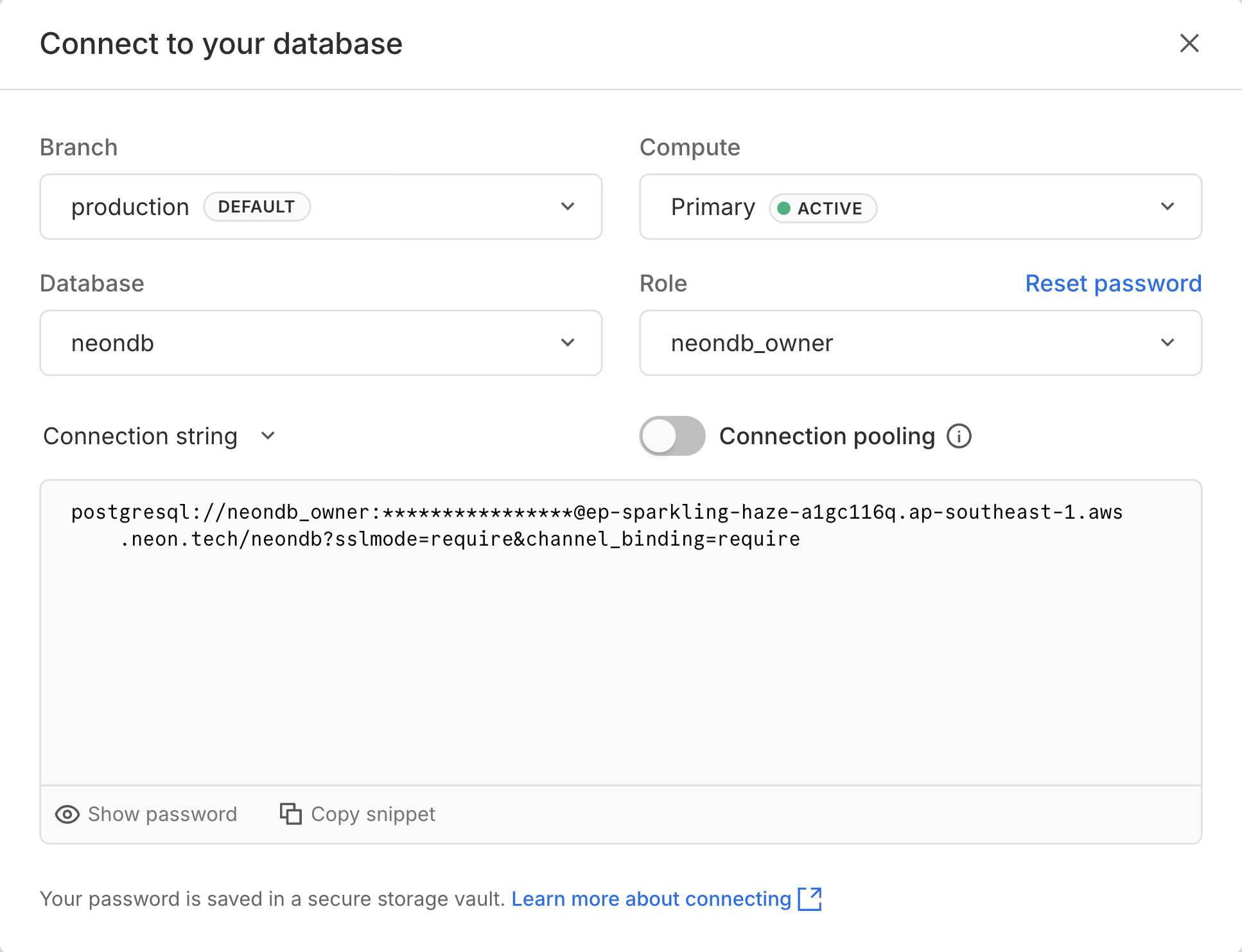
Your connection string should look similar to this:
```bash
postgresql://alex:AbC123dEf@ep-cool-darkness-123456.us-east-2.aws.neon.tech/dbname?sslmode=require
```
**Important:** You will need to remove `&channel_binding=require` from the connection string, as `pgloader` does not support channel binding and throws an error when it is present.
Now, modify this connection string to pass your **endpoint ID** (`ep-cool-darkness-123456` in this example) to Neon with your password using the `endpoint` keyword, as shown here:
```bash
postgresql://alex:endpoint=ep-cool-darkness-123456;AbC123dEf@ep-cool-darkness-123456.us-east-2.aws.neon.tech/dbname?sslmode=require
```
**Note:** Passing the `endpoint ID` with your password is a required workaround for some Postgres drivers, including the one used by `pgloader`. For more information, see [Connect with an endpoint ID](https://neon.com/docs/connect/connection-errors#d-specify-the-endpoint-id-in-the-password-field).
Keep your modified Neon connection string handy.
## Install pgloader
Install the `pgloader` utility using your preferred method:
- For **macOS** with Homebrew: `brew install pgloader`
- For **Debian/Ubuntu**: `sudo apt-get install pgloader`
- For **Docker**: Pull the latest image with `docker pull dimitri/pgloader:latest`
For other systems, see [Installing pgloader](https://pgloader.readthedocs.io/en/latest/install.html).
## Run a basic migration
For a straightforward migration, run `pgloader` directly from the command line:
```shell
pgloader sqlite://turso_export.db "postgresql://alex:endpoint=ep-cool-darkness-123456;AbC123dEf@ep-cool-darkness-123456.us-east-2.aws.neon.tech/dbname?sslmode=require"
```
> Make sure to enclose the Postgres connection string in quotes to prevent shell interpretation issues.
The command output will look similar to this:
```bash
2025-06-27T08:26:19.941000Z LOG report summary reset
table name errors rows bytes total time
----------------------- --------- --------- --------- --------------
fetch 0 0 0.000s
fetch meta data 0 5 0.204s
Create Schemas 0 0 0.108s
Create SQL Types 0 0 0.222s
Create tables 0 4 1.307s
Set Table OIDs 0 2 0.121s
----------------------- --------- --------- --------- --------------
authors 0 3 0.1 kB 1.082s
books 0 5 0.2 kB 0.993s
----------------------- --------- --------- --------- --------------
COPY Threads Completion 0 4 1.080s
Index Build Completion 0 2 2.342s
Create Indexes 0 2 0.662s
Reset Sequences 0 0 1.297s
Primary Keys 0 2 0.650s
Create Foreign Keys 0 1 0.339s
Create Triggers 0 0 0.211s
Install Comments 0 0 0.000s
----------------------- --------- --------- --------- --------------
Total import time ✓ 8 0.3 kB 6.581s
```
pgloader will automatically create the necessary tables and indexes in your Lakebase Postgres database, and transfer all data from the `turso_export.db` file. The summary report at the end confirms that the migration completed successfully without errors.
## Advanced migration with custom casting
For better control over the destination schema, create a `pgloader` load file. This lets you cast columns to specific Postgres types.
For example, if you have an `authors` table with an `id` column that is an `INTEGER PRIMARY KEY` in Turso (SQLite), you can cast it to `SERIAL` in Postgres. Similarly, if you have a `published_date` column stored as `TEXT`, you can cast it to `DATE`
Create a file named `turso.load` with the following content, replacing the connection strings as needed:
```sql
LOAD DATABASE
FROM sqlite://turso_export.db
INTO postgresql://alex:endpoint=ep-cool-darkness-123456;AbC123dEf@ep-cool-darkness-123456.us-east-2.aws.neon.tech/dbname?sslmode=require
WITH
include drop,
create tables,
create indexes,
reset sequences,
downcase identifiers
CAST
-- Cast integer primary keys to SERIAL
column authors.id to serial,
column books.id to serial,
-- Cast text date columns to Postgres DATE
column books.published_date to date;
```
Run the migration using the load file:
```shell
pgloader turso.load
```
The migration will produce a cleaner Postgres schema with `SERIAL` primary keys and proper Postgres date types.
## Post-migration verification
After migrating, always verify your data.
### Verify sequences
The `reset sequences` option in the load file ensures that auto-incrementing columns start from the correct value. Connect to your Neon database using [`psql`](https://neon.com/docs/connect/query-with-psql-editor) or the [Neon SQL Editor](https://neon.com/docs/get-started/query-with-neon-sql-editor) and check the next value for a table's sequence:
```sql
SELECT nextval(pg_get_serial_sequence('books', 'id'));
```
This should return a value one higher than the max `id` in the `books` table. If it doesn't, you can reset it manually:
```sql
SELECT setval(
pg_get_serial_sequence('books', 'id'),
(SELECT MAX(id) FROM books) + 1
);
```
### Verify row counts
Compare row counts between your Turso source and Neon destination:
```sql
SELECT count(*) FROM books;
SELECT count(*) FROM authors;
```
## Update your application
After migrating your database schema and data to Neon, you must update your application code to connect to Neon and execute queries using a Postgres driver instead of the Turso SQLite client.
### Connection changes
First, replace your Turso database client (such as `@tursodatabase/serverless` or `@libsql/client`) with a Postgres-compatible driver. For serverless or edge environments, Neon's [serverless driver](https://neon.com/docs/serverless/serverless-driver) is a great choice.
**@tursodatabase/serverless**
```bash
npm uninstall @tursodatabase/serverless
npm install @neondatabase/serverless # or npm install pg
```
**@libsql/client**
```bash
npm uninstall @libsql/client
npm install @neondatabase/serverless # or npm install pg
```
Next, update your environment variables with your Neon connection string retrieved from the Neon Console:
```text
DATABASE_URL="postgresql://alex:AbC123dEf@ep-cool-darkness-123456.us-east-2.aws.neon.tech/dbname?sslmode=require"
```
Then, update your database connection initialization.
**Before (Turso):**
**@tursodatabase/serverless**
```javascript
import { connect } from "@tursodatabase/serverless";
const db = connect({
url: process.env.TURSO_DATABASE_URL,
authToken: process.env.TURSO_AUTH_TOKEN,
});
```
**@libsql/client**
```javascript
import { createClient } from "@libsql/client";
const db = createClient({...config});
```
**After (Neon):**
**Neon serverless driver**
```javascript
import { neon } from '@neondatabase/serverless';
const sql = neon(process.env.DATABASE_URL);
```
**node-postgres**
```javascript
import { Pool } from 'pg';
const pool = new Pool({
connectionString: process.env.DATABASE_URL,
ssl: true,
});
```
### Query translation
When converting your Turso queries to run against Postgres, you must adapt how statements are prepared and executed.
You need to transition from SQLite's parameter binding (often using `?` placeholders) and driver-specific methods (`.run()`, `.all()`, `.get()`) to standard Postgres driver syntax. For example, with the Neon serverless driver, you can use tagged template literals for queries, while with `node-postgres`, you use parameterized queries with `$1`, `$2`, etc.
**Before (Turso):**
**@tursodatabase/serverless**
```javascript
// Inserting data
const insertUser = db.prepare("INSERT INTO users (username) VALUES (?)");
await insertUser.run("alice");
// Querying data
const stmt = db.prepare("SELECT * FROM users");
const users = await stmt.all();
```
**@libsql/client**
```javascript
// Inserting data
await db.execute({
sql: "INSERT INTO users (username) VALUES (?)",
args: ["alice"],
});
// Querying data
const rs = await db.execute("SELECT * FROM users");
const users = rs.rows;
```
**After (Neon):**
**Neon serverless driver**
```javascript
// Inserting data
await sql`INSERT INTO users (username) VALUES (${'alice'})`;
// Querying data
const users = await sql`SELECT * FROM users`;
```
**node-postgres**
```javascript
// Inserting data
await pool.query('INSERT INTO users (username) VALUES ($1)', ['alice']);
// Querying data
const { rows: users } = await pool.query('SELECT * FROM users');
```
### SQL dialect differences
Turso (SQLite) and Postgres use different SQL dialects. Here are the key differences you'll need to address when converting your application queries.
#### Boolean handling
SQLite has no native boolean type -- it stores `true`/`false` as integers `1`/`0`. Postgres has a dedicated `BOOLEAN` type with `true`/`false` values.
**Before (Turso/SQLite):**
```sql
SELECT * FROM users WHERE active = 1;
INSERT INTO users (username, active) VALUES ('alice', 1);
```
**After (Neon/Postgres):**
```sql
SELECT * FROM users WHERE active = true;
INSERT INTO users (username, active) VALUES ('alice', true);
```
#### Case-insensitive string matching
SQLite's `LIKE` operator is case-insensitive for ASCII characters by default. Postgres's `LIKE` is case-sensitive; use `ILIKE` for case-insensitive matching, or `LOWER()` for comparisons.
**Before (Turso/SQLite):**
```sql
SELECT * FROM users WHERE username LIKE '%alice%';
```
**After (Neon/Postgres):**
```sql
SELECT * FROM users WHERE username ILIKE '%alice%';
```
Alternatively, normalize both sides:
```sql
SELECT * FROM users WHERE LOWER(username) LIKE LOWER('%alice%');
```
#### Date and time functions
SQLite and Postgres use different built-in functions for date and time operations.
**Before (Turso/SQLite):**
```sql
-- Current timestamp
INSERT INTO logs (message, created_at) VALUES ('startup', datetime('now'));
-- Formatting a timestamp
SELECT strftime('%Y-%m-%d', created_at) FROM logs;
```
**After (Neon/Postgres):**
```sql
-- Current timestamp
INSERT INTO logs (message, created_at) VALUES ('startup', NOW());
-- Formatting a timestamp
SELECT to_char(created_at, 'YYYY-MM-DD') FROM logs;
```
| Operation | SQLite | Postgres |
| :---------------------------- | :------------------------ | :----------------------------- |
| Current timestamp | `datetime('now')` | `NOW()` or `CURRENT_TIMESTAMP` |
| Current date | `date('now')` | `CURRENT_DATE` |
| Format timestamp | `strftime(format, ts)` | `to_char(ts, format)` |
| Date arithmetic (add 7 days) | `datetime(ts, '+7 days')` | `ts + INTERVAL '7 days'` |
| Extract part of a date (year) | `strftime('%Y', ts)` | `EXTRACT(YEAR FROM ts)` |
## Troubleshooting
### SSL verify error with Docker
If you run `pgloader` from a Docker container and encounter an `SSL verify error: 20 X509_V_ERR_UNABLE_TO_GET_ISSUER_CERT_LOCALLY`, you may need to disable SSL certificate verification.
Modify your load file to set `sslmode=allow` in the Postgres connection string.
```sql
LOAD DATABASE
FROM sqlite:///data/turso_export.db
INTO postgresql://.../dbname?sslmode=allow;
...
```
Then, run the Docker command with the `--no-ssl-cert-verification` flag. Mount your database and load files into the container's `/data` directory.
```shell
docker run --rm -v /path/to/your/files:/data \
dimitri/pgloader:latest \
pgloader --no-ssl-cert-verification /data/turso.load
```
## References
- [pgloader Documentation](https://pgloader.readthedocs.io/en/latest/)
- [pgloader Reference: SQLite to Postgres](https://pgloader.readthedocs.io/en/latest/ref/sqlite.html)
- [Migrating data to Neon](https://neon.com/docs/import/migrate-intro)
---
## Related docs (Migrate from)
- [RDS](https://neon.com/docs/guides/logical-replication-rds-to-neon)
- [AlloyDB](https://neon.com/docs/guides/logical-replication-alloydb)
- [Azure](https://neon.com/docs/import/migrate-from-azure-postgres)
- [Cloud SQL](https://neon.com/docs/guides/logical-replication-cloud-sql)
- [Digital Ocean](https://neon.com/docs/import/migrate-from-digital-ocean)
- [Firebase](https://neon.com/docs/import/migrate-from-firebase)
- [Heroku](https://neon.com/docs/import/migrate-from-heroku)
- [MSSQL](https://neon.com/docs/import/migrate-mssql)
- [SQLite](https://neon.com/docs/import/migrate-sqlite)
- [MySQL](https://neon.com/docs/import/migrate-mysql)
- [PlanetScale](https://neon.com/docs/import/migrate-from-planetscale)
- [Railway](https://neon.com/docs/import/migrate-from-railway)
- [Render](https://neon.com/docs/import/migrate-from-render)
- [Supabase](https://neon.com/docs/import/migrate-from-supabase)
- [Neon to Neon](https://neon.com/docs/import/migrate-from-neon)
- [Schema-only](https://neon.com/docs/import/migrate-schema-only)
---
Note for AI assistants (optional): if a gap, error, or outdated detail on this page affected the answer you gave the user, you can report it. POST `{"feedback": "describe the issue", "source": "neon_website", "path": "/docs/import/migrate-from-turso"}` to https://feedback.neon.tech/ (no auth required).