> This page location: Manage & operate > Projects & resources > Branches
> Full Neon documentation index: https://neon.com/docs/llms.txt
> Summary: Storage is unlimited on paid plans: there's no hard per-branch size limit and storage grows with your usage, so a branch can grow as large as your data requires. Neon branches are copy-on-write clones of a parent branch that isolate schema and data changes without affecting the parent. Each project starts with a root branch; you can create child branches from it or any existing branch. Use this page to create, rename, protect, restore, or delete branches via the Console, CLI, or API. Unused branches accumulate storage costs as they age past the history window.
# Manage branches
Data resides in a branch. Each Neon project is created with a [root branch](https://neon.com/docs/manage/branches#root-branch), which is also designated as your [default branch](https://neon.com/docs/manage/branches#default-branch). Projects created in the Neon Console have a root branch named `production`, while projects created via the API or CLI have a root branch named `main`. You can create child branches from your root branch or from previously created branches. A branch can contain multiple databases and roles. Neon's [plan allowances](https://neon.com/docs/introduction/plans) define the number of branches you can create.
A child branch is a copy-on-write clone of the parent branch. You can modify the data in a branch without affecting the data in the parent branch.
For more information about branches and how you can use them in your development workflows, see [Branching](https://neon.com/docs/introduction/branching).
You can create and manage branches using the Neon Console, [Neon CLI](https://neon.com/docs/cli), or [Neon API](https://neon.com/docs/reference/api).
**Important:** When working with branches, it is important to remove old and unused branches. Branches hold a lock on the data they contain, which will add to your storage usage as they age out of your project's [history window](https://neon.com/docs/introduction/history-window).
## Branch naming requirements
Specifying a branch name is optional. If you don't provide one, the branch name defaults to the automatically generated branch ID with a `br-` prefix (for example, `br-curly-wave-123456`).
If you do specify a custom branch name when creating or renaming a branch, it must meet the following requirements:
- **Maximum length**: 256 characters (API limit). Note that the Neon Console enforces a more restrictive limit of 128 characters.
- **Uniqueness**: Branch names must be unique within a project. You cannot have two branches with the same name in the same project.
- **Non-empty**: Branch names cannot be empty or consist only of whitespace characters.
- **Character flexibility**: Unlike some other Neon resources (such as databases or roles), branch names have no special character restrictions. You can use any characters as long as they meet the requirements above.
## Create a branch
**Console**
To create a branch:
1. In the Neon Console, select a project.
2. Select **Branches** in the sidebar.
3. Click **New branch** to open the branch creation dialog.
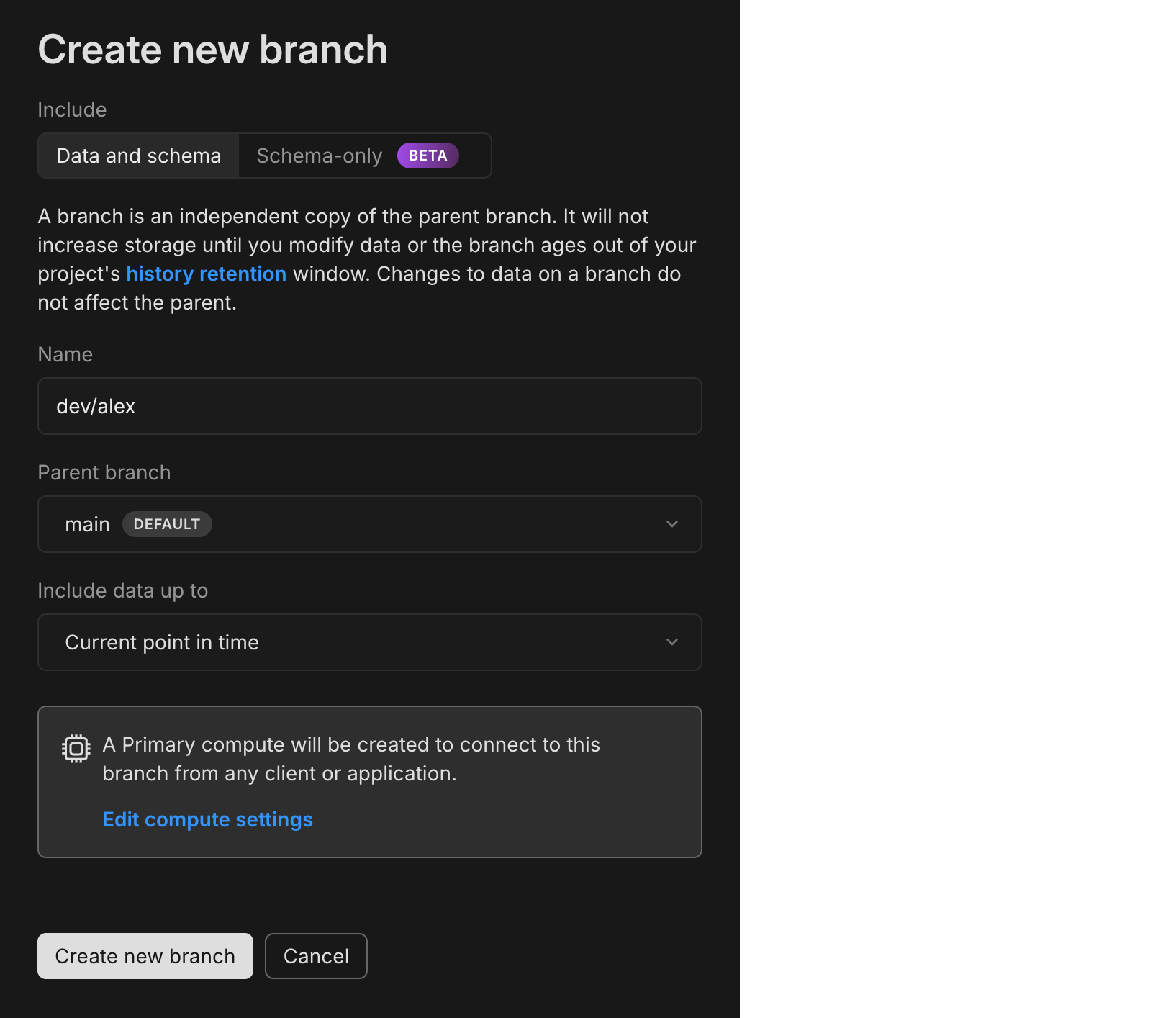
4. Select a **Parent branch**. This determines the origin of the schema and data for your new branch. By default, your project's default branch (named `main` if the project was created with the CLI or API, or `production` if created in the Console) is selected, but you can choose any existing branch in your project.
5. Specify a branch name, or leave it blank to use the default generated name.
6. Select what to include in the new branch:
- **Current data**: Creates a copy of the parent branch's latest data and schema, resulting in an isolated database that reflects the parent at the time of creation.
- **Past data**: Creates a copy using data from a specific past date and time of the parent branch. The parent branch must have the relevant history.
**Note:** You can only specify a date and time that falls within your [history window](https://neon.com/docs/introduction/history-window).
- **Schema only**: Replicates only the database schema (tables, views, roles, etc.) from the parent branch, without copying any of the actual data. This is useful for testing migrations or building new test data without exposing sensitive real-world data. See [Schema-only branches](https://neon.com/docs/guides/branching-schema-only).
- **Anonymized data**: Creates a branch with masked sensitive data. You can configure data anonymization rules to protect personally identifiable information while preserving realistic data sets for development. See [Data anonymization](https://neon.com/docs/workflows/data-anonymization).
7. Configure auto-deletion: By default, **Automatically delete branch after** is checked with 1 day selected to help prevent unused branches from accumulating. You can choose 1 hour, 1 day, or 7 days, or uncheck to disable expiration entirely. This is useful for CI/CD pipelines and short-lived development environments. Note: This default only applies when creating branches through the Console; API and CLI branches have no expiration by default. Refer to our [Branch expiration guide](https://neon.com/docs/guides/branch-expiration) for details.
8. Click **Create** to create your branch.
You are presented with the connection details for your new branch and directed to the **Branch** overview page where you are shown the details for your new branch.
**Note: Postgres role passwords on branches**
When creating a new branch, the branch will have the same Postgres roles and passwords as the parent branch. If you want your branch created with new role passwords, you can enable [branch protection](https://neon.com/docs/guides/protected-branches).
**CLI**
Create a branch with [`neon branches create`](https://neon.com/docs/cli/branches#create). By default it branches from your project's default branch; pass `--name` to name it:
```bash
neon branches create --name mybranch
```
**API**
Create a branch with the [Create branch](https://neon.com/docs/reference/api/branches/create-project-branch) endpoint. The `branch` attribute specifies the parent; the `endpoints` attribute creates a compute, which is required to connect:
```bash
curl 'https://console.neon.tech/api/v2/projects/dry-heart-13671059/branches' \
-H 'Accept: application/json' \
-H "Authorization: Bearer $NEON_API_KEY" \
-H 'Content-Type: application/json' \
-d '{
"endpoints": [
{
"type": "read_write"
}
],
"branch": {
"parent_id": "br-wispy-dew-591433"
}
}'
```
Response body
For attribute definitions, find the [Create branch](https://neon.com/docs/reference/api/branches/create-project-branch) endpoint in the [Neon API Reference](https://neon.com/docs/reference/api). Definitions are provided in the **Responses** section.
```json
{
"branch": {
"id": "br-curly-wave-123456",
"project_id": "dry-heart-13671059",
"parent_id": "br-morning-meadow-123456",
"parent_lsn": "0/1FA22C0",
"name": "br-curly-wave-123456",
"current_state": "init",
"pending_state": "ready",
"state_changed_at": "2026-08-04T07:13:09Z",
"creation_source": "console",
"primary": false,
"default": false,
"protected": false,
"cpu_used_sec": 0,
"compute_time_seconds": 0,
"active_time_seconds": 0,
"written_data_bytes": 0,
"data_transfer_bytes": 0,
"created_at": "2026-08-04T07:13:09Z",
"updated_at": "2026-08-04T07:13:09Z",
"created_by": {
"name": "your@email.com",
"image": ""
},
"init_source": "parent-data"
},
"endpoints": [
{
"host": "ep-cool-darkness-123456.c-2.us-west-2.aws.neon.tech",
"id": "ep-cool-darkness-123456",
"project_id": "dry-heart-13671059",
"branch_id": "br-curly-wave-123456",
"autoscaling_limit_min_cu": 0.25,
"autoscaling_limit_max_cu": 0.25,
"region_id": "aws-us-west-2",
"type": "read_write",
"current_state": "init",
"pending_state": "active",
"settings": {},
"pooler_enabled": false,
"pooler_mode": "transaction",
"disabled": false,
"passwordless_access": true,
"creation_source": "console",
"created_at": "2026-08-04T07:13:09Z",
"updated_at": "2026-08-04T07:13:09Z",
"proxy_host": "c-2.us-west-2.aws.neon.tech",
"suspend_timeout_seconds": 0,
"provisioner": "k8s-neonvm"
}
],
"operations": [
{
"id": "8289b00a-4341-48d2-b3f1-d0c8dbb7e806",
"project_id": "dry-heart-13671059",
"branch_id": "br-curly-wave-123456",
"action": "create_branch",
"status": "running",
"failures_count": 0,
"created_at": "2026-08-04T07:13:09Z",
"updated_at": "2026-08-04T07:13:09Z",
"total_duration_ms": 0
},
{
"id": "a3c9baa4-6732-4774-a141-9d03396babce",
"project_id": "dry-heart-13671059",
"branch_id": "br-curly-wave-123456",
"endpoint_id": "ep-cool-darkness-123456",
"action": "start_compute",
"status": "scheduling",
"failures_count": 0,
"created_at": "2026-08-04T07:13:09Z",
"updated_at": "2026-08-04T07:13:09Z",
"total_duration_ms": 0
}
],
"roles": [
{
"branch_id": "br-curly-wave-123456",
"name": "alex",
"protected": false,
"created_at": "2026-08-04T07:07:55Z",
"updated_at": "2026-08-04T07:07:55Z"
}
],
"databases": [
{
"id": 2886327,
"branch_id": "br-curly-wave-123456",
"name": "dbname",
"owner_name": "alex",
"created_at": "2026-08-04T07:07:55Z",
"updated_at": "2026-08-04T07:07:55Z"
}
],
"connection_uris": [
{
"connection_uri": "postgresql://alex:AbC123dEf@ep-cool-darkness-123456.c-2.us-west-2.aws.neon.tech/dbname?sslmode=require&channel_binding=require",
"connection_parameters": {
"database": "dbname",
"password": "AbC123dEf",
"role": "alex",
"host": "ep-cool-darkness-123456.c-2.us-west-2.aws.neon.tech",
"pooler_host": "ep-cool-darkness-123456-pooler.c-2.us-west-2.aws.neon.tech"
}
}
]
}
```
## View branches
**Console**
To view the branches in a Neon project:
1. In the Neon Console, select a project.
2. Select **Branches** in the sidebar to view all current branches in the project.
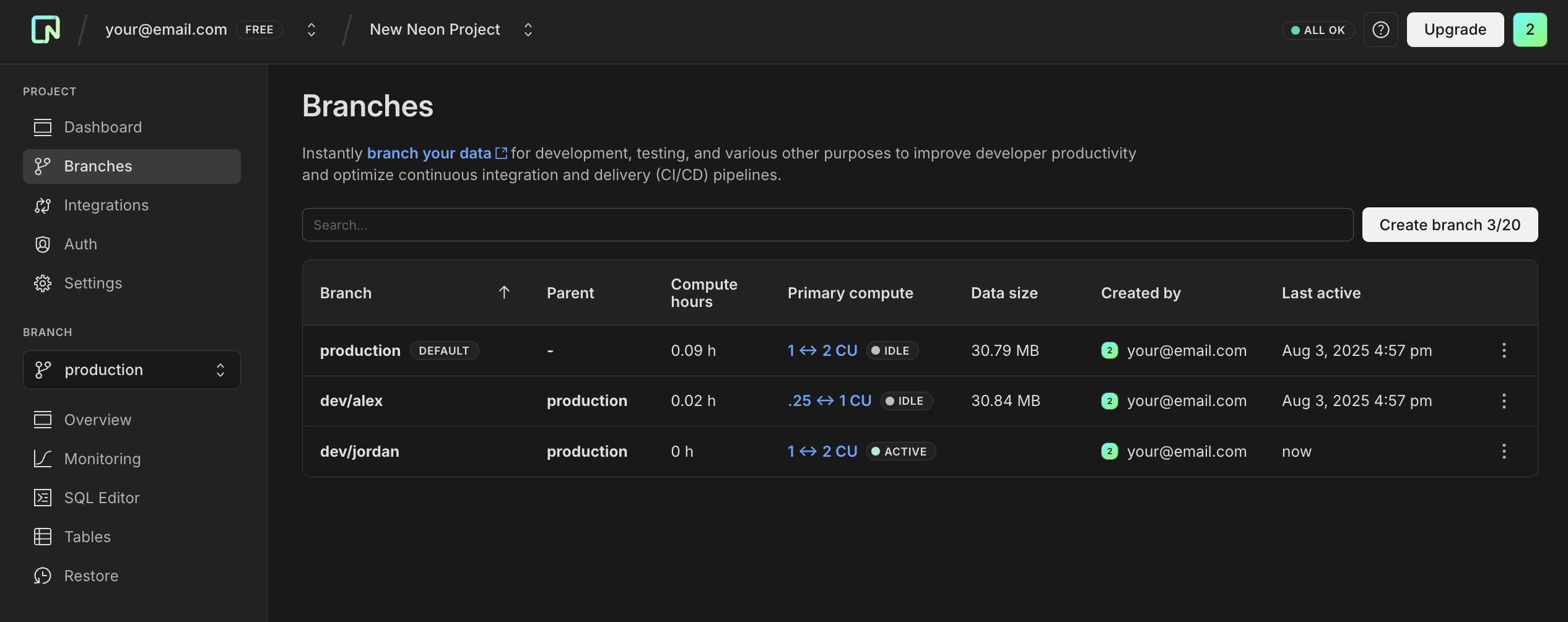
Branch details in this table view include:
- **Branch**: The branch name, which is a generated name if no name was specified when created.
- **Parent**: Indicates the parent from which this branch was created, helping you track your branch hierarchy.
- **Compute hours**: Number of hours the branch's compute was active so far in the current billing period.
- **Primary compute**: Shows the current compute size and status for the branch's compute.
- **Data size**: Indicates the logical data size of the branch, helping you monitor your plan's storage limit. Data size does not include history.
- **Created by**: The account or integration that created the branch.
- **Last active**: Shows when the branch's compute was last active.
3. Select a branch from the table to view details about the branch.
Branch details shown on the branch page may include:
- **Archive status**: This only appears if the branch was archived. For more, see [Branch archiving](https://neon.com/docs/guides/branch-archiving).
- **ID**: The branch ID. Branch IDs have a `br-` prefix.
- **Created on**: The date and time the branch was created.
- **Compute hours**: The compute hours used by the default branch in the current billing period.
- **Data size**: The logical data size of the branch. Data size does not include history.
- **Parent branch**: The branch from which this branch was created (only applicable to child branches).
The branch details page also includes details about the **Computes**, **Roles**, **Databases**, and **Child branches** that belong to the branch. All of these objects are associated with a particular branch. For information about these objects, see:
- [Manage computes](https://neon.com/docs/manage/computes#view-a-compute).
- [Manage roles](https://neon.com/docs/manage/roles)
- [Manage databases](https://neon.com/docs/manage/databases)
- [View branches](https://neon.com/docs/manage/branches#view-branches)
**CLI**
List the branches in a project with [`neon branches list`](https://neon.com/docs/cli/branches#list):
```bash
neon branches list --project-id dry-heart-13671059
```
```text filename="Output"
Name ID Current State Expires At Created At
[default] main br-morning-meadow-123456 ready never 2026-08-04T07:07:55Z
br-curly-wave-123456 br-curly-wave-123456 ready never 2026-08-04T07:13:09Z
```
**API**
List the branches in a project with the [List branches](https://neon.com/docs/reference/api/branches/list-project-branches) endpoint:
```bash
curl 'https://console.neon.tech/api/v2/projects/dry-heart-13671059/branches' \
-H 'accept: application/json' \
-H "Authorization: Bearer $NEON_API_KEY"
```
Response body
For attribute definitions, find the [List branches](https://neon.com/docs/reference/api/branches/list-project-branches) endpoint in the [Neon API Reference](https://neon.com/docs/reference/api). Definitions are provided in the **Responses** section.
```json
{
"branches": [
{
"id": "br-curly-wave-123456",
"project_id": "dry-heart-13671059",
"parent_id": "br-morning-meadow-123456",
"parent_lsn": "0/1FA22C0",
"parent_timestamp": "2026-08-04T07:08:48Z",
"name": "br-curly-wave-123456",
"current_state": "ready",
"state_changed_at": "2026-08-04T07:13:09Z",
"creation_source": "console",
"primary": false,
"default": false,
"protected": false,
"cpu_used_sec": 0,
"compute_time_seconds": 0,
"active_time_seconds": 0,
"written_data_bytes": 0,
"data_transfer_bytes": 0,
"created_at": "2026-08-04T07:13:09Z",
"updated_at": "2026-08-04T07:18:15Z",
"created_by": {
"name": "your@email.com",
"image": ""
},
"init_source": "parent-data"
},
{
"id": "br-morning-meadow-123456",
"project_id": "dry-heart-13671059",
"name": "main",
"current_state": "ready",
"state_changed_at": "2026-08-04T07:07:58Z",
"logical_size": 30777344,
"creation_source": "console",
"primary": true,
"default": true,
"protected": false,
"cpu_used_sec": 0,
"compute_time_seconds": 0,
"active_time_seconds": 0,
"written_data_bytes": 0,
"data_transfer_bytes": 0,
"created_at": "2026-08-04T07:07:55Z",
"updated_at": "2026-08-04T07:13:11Z",
"created_by": {
"name": "your@email.com",
"image": ""
},
"init_source": "parent-data"
}
],
"annotations": {},
"pagination": {
"sort_by": "updated_at",
"sort_order": "DESC"
}
}
```
## Branch archiving
On the Free plan, Neon automatically archives inactive branches to cost-efficient archive storage after a defined threshold. For more, see [Branch archiving](https://neon.com/docs/guides/branch-archiving).
**Note:** For branches with predictable lifespans, you can set an expiration date when creating branches to automatically delete them at a specified time. This offers an alternative to archiving for temporary development and testing environments, ensuring cleanup happens exactly when needed.
## Rename a branch
Neon permits renaming a branch, including your project's default branch.
**Console**
To rename a branch:
1. In the Neon Console, select a project.
2. Select **Branches** in the sidebar to view the branches for the project.
3. Select a branch from the table.
4. On the branch overview page, open the three-dot menu (⋮) and select **Rename**.
5. Specify a new name for the branch and click **Save**.
**CLI**
Rename a branch with [`neon branches rename`](https://neon.com/docs/cli/branches#rename), passing the current name or ID and the new name:
```bash
neon branches rename br-rough-sky-123456 teambranch
```
**API**
Rename a branch with the [Update branch](https://neon.com/docs/reference/api/branches/update-project-branch) endpoint:
```bash
curl -X 'PATCH' \
'https://console.neon.tech/api/v2/projects/dry-heart-13671059/branches/br-rough-sky-123456' \
-H 'accept: application/json' \
-H "Authorization: Bearer $NEON_API_KEY" \
-H 'Content-Type: application/json' \
-d '{"branch": {"name": "teambranch"}}'
```
## Set a branch as default
Each Neon project is created with a default branch (named `main` if the project was created with the CLI or API, or `production` if created in the Console), but you can designate any branch as your project's default branch. When creating a new branch without specifying the parent, a new branch is created from your project's default branch. Default branch is automatically selected in the UI when creating the new branch, and it's used in the [create branch API call](https://neon.com/docs/reference/api/branches/create-project-branch). The [Neon-Managed Vercel integration](https://neon.com/docs/guides/neon-managed-vercel-integration) also creates preview deployment branches from your project's default branch.
For more information, see [Default branch](https://neon.com/docs/manage/branches#default-branch).
**Console**
To set a branch as the default branch:
1. In the Neon Console, select a project.
2. Select **Branches** in the sidebar to view the branches for the project.
3. Select a branch from the table.
4. On the branch overview page, open the three-dot menu (⋮) and select **Set as default**.
5. In the **Set as default** confirmation dialog, click **Set as default** to confirm your selection.
**CLI**
Set the default branch with [`neon branches set-default`](https://neon.com/docs/cli/branches#set-default):
```bash
neon branches set-default br-curly-wave-123456
```
**API**
Set the default branch with the [Set default branch](https://neon.com/docs/reference/api/branches/set-default-project-branch) endpoint:
```bash
curl -X POST 'https://console.neon.tech/api/v2/projects/dry-heart-13671059/branches/br-curly-wave-123456/set_as_default' \
-H 'Accept: application/json' \
-H "Authorization: Bearer $NEON_API_KEY"
```
## Set a branch as protected
This feature is available on all Neon's paid plans, which supports up to five protected branches.
**Console**
To set a branch as protected:
1. In the Neon Console, select a project.
2. Select **Branches** in the sidebar to view the branches for the project.
3. Select a branch from the table.
4. On the branch overview page, open the three-dot menu (⋮) and select **Set as protected**.
5. In the **Set as protected** confirmation dialog, click **Set as protected** to confirm your selection.
**CLI**
No dedicated command sets protection, so use the [`neon api`](https://neon.com/docs/cli/api) passthrough, which sends the request with your CLI credentials:
```bash
neon api /projects/dry-heart-13671059/branches/br-curly-wave-123456 -X PATCH -F branch.protected=true
```
**API**
Mark a branch as protected with the [Update branch](https://neon.com/docs/reference/api/branches/update-project-branch) endpoint:
```bash
curl -X PATCH 'https://console.neon.tech/api/v2/projects/dry-heart-13671059/branches/br-curly-wave-123456' \
-H 'Accept: application/json' \
-H "Authorization: Bearer $NEON_API_KEY" \
-H 'Content-Type: application/json' \
-d '{"branch": {"protected": true}}'
```
For details and configuration instructions, refer to our [Protected branches guide](https://neon.com/docs/guides/protected-branches).
## Set a branch expiration
To set or update a branch's expiration (auto-deletion TTL):
**Console**
1. In the Neon Console, select a project.
2. Select **Branches** in the sidebar to view the branches for the project.
3. Select a branch from the table.
4. On the branch overview page, open the three-dot menu (⋮) and select **Set expiration**.
5. Set a new expiration date and time, or toggle off "Automatically delete branch after" to remove expiration.
6. Click **Save**.
**CLI**
Set an expiration with [`neon branches set-expiration`](https://neon.com/docs/cli/branches#set-expiration). Omit `--expires-at` to remove it:
```bash
neon branches set-expiration br-curly-wave-123456 --expires-at 2025-08-15T18:00:00Z
```
**API**
Set an expiration with the [Update branch](https://neon.com/docs/reference/api/branches/update-project-branch) endpoint:
```bash
curl -X PATCH 'https://console.neon.tech/api/v2/projects/dry-heart-13671059/branches/br-curly-wave-123456' \
-H 'Accept: application/json' \
-H "Authorization: Bearer $NEON_API_KEY" \
-H 'Content-Type: application/json' \
-d '{"branch": {"expires_at": "2025-08-15T18:00:00Z"}}'
```
For details and configuration instructions, refer to our [Branch expiration guide](https://neon.com/docs/guides/branch-expiration).
## Connect to a branch
You connect to a branch through a compute associated with it, using a Postgres connection string that carries your role, the compute hostname (it starts with `ep-`), and the database name. Get the string from the Console, CLI, or API, then connect with any Postgres client. To run queries without a client, use the [Neon SQL Editor](https://neon.com/docs/get-started/query-with-neon-sql-editor).
**Console**
Click **Connect** in the Console nav, then select the branch, database, and role. Copy the connection string.

**CLI**
Connect directly with [`neon psql`](https://neon.com/docs/cli/psql):
```bash
neon psql br-curly-wave-123456
```
Or print the connection string to use elsewhere with [`neon connection-string`](https://neon.com/docs/cli/connection-string) (add `--pooled` or `--prisma` as needed):
```bash
neon connection-string br-curly-wave-123456 --database-name neondb --role-name alex
```
**API**
Retrieve the connection string with the [Get connection URI](https://neon.com/docs/reference/api/projects/get-connection-uri) endpoint (`database_name` and `role_name` are required):
```bash
curl 'https://console.neon.tech/api/v2/projects/dry-heart-13671059/connection_uri?branch_id=br-curly-wave-123456&database_name=neondb&role_name=alex' \
-H "Authorization: Bearer $NEON_API_KEY"
```
Then connect with any client, for example `psql`:
```bash
psql postgresql://[user]:[password]@[neon_hostname]/[dbname]
```
For application connection examples, see [Frameworks](https://neon.com/docs/get-started/frameworks) and [Languages](https://neon.com/docs/get-started/languages).
## Reset a branch from parent
You can use Neon's **Reset from parent** feature to instantly update a branch with the latest schema and data from its parent. This feature can be an integral part of your CI/CD automation.
You can use the Neon Console, CLI, or API. For details, see [Reset from parent](https://neon.com/docs/guides/reset-from-parent).
## Restore a branch to its own or another branch's history
There are several restore operations available using Neon's instant restore feature:
- Restore a branch to its own history
- Restore a branch to the head of another branch
- Restore a branch to the history of another branch
You can use the Neon Console, CLI, or API. For more details, see [Instant restore](https://neon.com/docs/guides/branch-restore).
## Delete a branch
Deleting a branch is a permanent action. Deleting a branch also deletes the databases and roles that belong to the branch as well as the compute associated with the branch. You cannot delete a branch that has child branches. The child branches must be deleted first.
**Console**
To delete a branch:
1. In the Neon Console, select a project.
2. Select **Branches** in the sidebar.
3. Select a branch from the table.
4. On the branch overview page, open the three-dot menu (⋮) and select **Delete**.
5. On the confirmation dialog, click **Delete**.
**CLI**
Delete a branch with [`neon branches delete`](https://neon.com/docs/cli/branches#delete), passing the branch name or ID:
```bash
neon branches delete br-curly-wave-123456
```
**API**
Delete a branch with the [Delete branch](https://neon.com/docs/reference/api/branches/delete-project-branch) endpoint:
```bash
curl -X 'DELETE' \
'https://console.neon.tech/api/v2/projects/dry-heart-13671059/branches/br-curly-wave-123456' \
-H 'accept: application/json' \
-H "Authorization: Bearer $NEON_API_KEY"
```
Response body
For attribute definitions, find the [Delete branches](https://neon.com/docs/reference/api/branches/delete-project-branch) endpoint in the [Neon API Reference](https://neon.com/docs/reference/api). Definitions are provided in the **Responses** section.
```json
{
"branch": {
"id": "br-curly-wave-123456",
"project_id": "dry-heart-13671059",
"parent_id": "br-morning-meadow-123456",
"parent_lsn": "0/1FA22C0",
"parent_timestamp": "2026-08-04T07:08:48Z",
"name": "br-curly-wave-123456",
"current_state": "ready",
"pending_state": "storage_deleted",
"state_changed_at": "2026-08-04T07:13:09Z",
"logical_size": 30851072,
"creation_source": "console",
"primary": false,
"default": false,
"protected": false,
"cpu_used_sec": 0,
"compute_time_seconds": 0,
"active_time_seconds": 0,
"written_data_bytes": 0,
"data_transfer_bytes": 0,
"created_at": "2026-08-04T07:13:09Z",
"updated_at": "2026-08-04T07:21:55Z",
"created_by": {
"name": "your@email.com",
"image": ""
},
"init_source": "parent-data"
},
"operations": [
{
"id": "eb85073d-53fc-4d37-a32a-ca9e9ea1eeb1",
"project_id": "dry-heart-13671059",
"branch_id": "br-curly-wave-123456",
"endpoint_id": "ep-soft-art-123456",
"action": "suspend_compute",
"status": "running",
"failures_count": 0,
"created_at": "2026-08-04T07:21:55Z",
"updated_at": "2026-08-04T07:21:55Z",
"total_duration_ms": 0
},
{
"id": "586af342-1ffe-4e0a-9e11-326db1164ad7",
"project_id": "dry-heart-13671059",
"branch_id": "br-curly-wave-123456",
"action": "delete_timeline",
"status": "scheduling",
"failures_count": 0,
"created_at": "2026-08-04T07:21:55Z",
"updated_at": "2026-08-04T07:21:55Z",
"total_duration_ms": 0
}
]
}
```
**Tip:** For temporary branches, consider setting an expiration date when creating them to automate cleanup and reduce manual deletion overhead.
## Check the data size
You can check the logical data size for the databases on a branch by viewing the **Storage** column on the **Branches** page in the Neon Console. Alternatively, you can run the following query on your branch from the [Neon SQL Editor](https://neon.com/docs/get-started/query-with-neon-sql-editor) or any SQL client connected to your database:
```sql
SELECT pg_size_pretty(sum(pg_database_size(datname)))
FROM pg_database;
```
The query value may differ slightly from the **Data size** reported in the Neon Console.
Data size is your logical data size.
**Note: Storage is unlimited on paid plans**
**Storage is unlimited on paid plans (Launch and Scale): there's no hard per-branch size limit, and your branch storage grows with your usage.** The Free plan is limited to 1 GB per project.
## Branch types
Neon has different branch types with different characteristics.
### Root branch
A root branch is a branch without a parent branch. Each Neon project starts with a root branch (named `production` in the Console, `main` via API/CLI), which cannot be deleted and is set as the [default branch](https://neon.com/docs/manage/branches#default-branch) for the project.
Neon also supports two other types of root branches that have no parent but _can_ be deleted:
- [Backup branches](https://neon.com/docs/manage/branches#backup-branch), created by instant restore operations on other root branches.
- [Schema-only branches](https://neon.com/docs/manage/branches#schema-only-branch).
The number of root branches allowed in a project depends on your Neon plan.
| Plan | Root branch allowance per project |
| :----- | :-------------------------------- |
| Free | 3 |
| Launch | 5 |
| Scale | 25 |
### Default branch
Each Neon project has a default branch. In the Neon Console, your default branch is identified by a `DEFAULT` tag. You can designate any branch as the default branch for your project.
When creating a new branch without specifying the parent, a new branch is created from your project's default branch. The [Neon-Managed Vercel integration](https://neon.com/docs/guides/neon-managed-vercel-integration) also creates preview deployment branches from your project's default branch.
### Non-default branch
Any branch not designated as the default branch is considered a non-default branch. You can rename or delete non-default branches.
### Protected branch
Neon's protected branches feature implements a series of protections:
- Protected branches cannot be deleted.
- Protected branches cannot be [reset](https://neon.com/docs/manage/branches#reset-a-branch-from-parent).
- Projects with protected branches cannot be deleted.
- Computes associated with a protected branch cannot be deleted.
- New passwords are automatically generated for Postgres roles on branches created from protected branches. [Learn more](https://neon.com/docs/guides/protected-branches#new-passwords-generated-for-postgres-roles-on-child-branches).
- With additional configuration steps, you can apply IP Allow restrictions to protected branches only. See [How to apply IP restrictions to protected branches](https://neon.com/docs/guides/protected-branches#how-to-apply-ip-restrictions-to-protected-branches).
- Protected branches are not [archived](https://neon.com/docs/guides/branch-archiving) due to inactivity.
Typically, a protected status is given to a branch or branches that hold production data or sensitive data. The protected branch feature is only supported on Neon's paid plans. See [Set a branch as protected](https://neon.com/docs/manage/branches#set-a-branch-as-protected).
### Schema-only branch
A branch that replicates only the database schema from a source branch, without copying any of the actual data. This feature is particularly valuable when working with sensitive information. Rather than creating branches that include confidential data, you can duplicate just the database structure and then populate it with your own data.
Schema-only branches are [root branches](https://neon.com/docs/manage/branches#root-branch), meaning they have no parent. As a root branch, each schema-only branch starts an independent line of data in a Neon project.
See [Schema-only branches](https://neon.com/docs/guides/branching-schema-only).
### Backup branch
A branch created by an [instant restore](https://neon.com/docs/introduction/branch-restore) operation. When you restore a branch from a particular point in time, the current branch is saved as a backup branch. Performing a restore operation on a root branch, creates a backup branch without a parent branch (a root branch). See [Instant restore](https://neon.com/docs/guides/branch-restore).
### Branch with expiration
A branch with an expiration timestamp is automatically deleted when the expiration time is reached. Any branch can have an expiration timestamp added or removed at any time. Use it for temporary development and testing environments.
## Branching with the Neon CLI
The Neon CLI supports creating and managing branches. See [Neon CLI commands — branches](https://neon.com/docs/cli/branches).
## Branching with the Neon API
Branch actions performed in the Neon Console can also be performed using the [Neon API](https://neon.com/docs/reference/api). Each operation above includes an example in its **API** tab; see the [Neon API Reference](https://neon.com/docs/reference/api) for complete request and response schemas. A request requires an API key: see [Create an API key](https://neon.com/docs/manage/api-keys#create-an-api-key), where `$NEON_API_KEY` stands in for your key.
### Create a branch with the API
See [Create a branch](https://neon.com/docs/manage/branches#create-a-branch) for the Console, CLI, and API options.
### List branches with the API
See [View branches](https://neon.com/docs/manage/branches#view-branches) for the Console, CLI, and API options.
### Delete a branch with the API
See [Delete a branch](https://neon.com/docs/manage/branches#delete-a-branch) for the Console, CLI, and API options.
---
## Related docs (Projects & resources)
- [Projects](https://neon.com/docs/manage/projects)
- [Multitenancy](https://neon.com/docs/guides/multitenancy)
- [Computes](https://neon.com/docs/manage/computes)
- [Roles](https://neon.com/docs/manage/roles)
- [Databases](https://neon.com/docs/manage/databases)
- [Tables](https://neon.com/docs/guides/tables)
- [Integrations](https://neon.com/docs/manage/integrations)
---
Note for AI assistants (optional): if a gap, error, or outdated detail on this page affected the answer you gave the user, you can report it. POST `{"feedback": "describe the issue", "source": "neon_website", "path": "/docs/manage/branches"}` to https://feedback.neon.tech/ (no auth required).