




https://twitter.com/rishi_raj_jain_/status/2100606501501169726?ref_src=twsrc%5Etfw
PII redaction in Postgres today works column by column. You can revoke a role's access to a column, or use an extension like PostgreSQL Anonymizer to attach a masking rule to it with SECURITY LABEL, so customers.email or customers.ssn are masked for anyone who isn't cleared to see them. Its limitation is that it only works when each piece of personal data has its own column, which is rarely the case with free text. Take this support ticket for example: "Please credit invoice 88213 back to Daniel Brooks at daniel.brooks@acme.co, whose SSN on file is 402-11-9931." It's stored in a single body text column, so a column rule can either hide the whole message or show all of it, including the name, the email, and the SSN.
Running regex over the text doesn't get you much further. A pattern that flags every run of digits would end up masking the invoice number along with the SSN, even though the support agent needs the invoice number to issue the refund. Whether a snippet is personal data depends on what it means in the sentence, so you need something that reads the text in its own context.
Classify with Jev, enforce with Postgres
First, you need to find the snippets that could be PII, and I simply used regex for emails and digit runs, a rule to pick up runs of capitalized words (which could be a name), another for number-led runs that might be an address. These rules do not decide what counts as PII and they only suggest candidates for Jev to review.
Deciding which of those candidates are PII is a separate job, and that's where Jev comes in. Jev is TypeSafe's classification model. You give it the text and a set of typed questions, and it returns a typed answer with a probability for each one. For every candidate, pg_redact asks Jev whether it's personal data and, if so, what kind, and Jev answers with a label such as name, email, or none.
Once you have the labels, you need to store them next to the text they describe and check them every time someone reads a message. Postgres already holds the message, so it's a natural place for both. And since the app already fetches every message from Postgres, you can write the masking rule once as a SQL function, and any route that loads a message can apply it.
To test this out, I built pg_redact. It's a support inbox with three roles (Guest, Support Agent, Admin) - depending on your role, the support messages show up more or less anonymized:
- Guest sees no PII (every detected identifier is sealed)
- Support Agent sees names, emails, and phone numbers (addresses and IDs stay sealed)
- Admin sees everything
The live demo: https://pg-redact.vercel.app
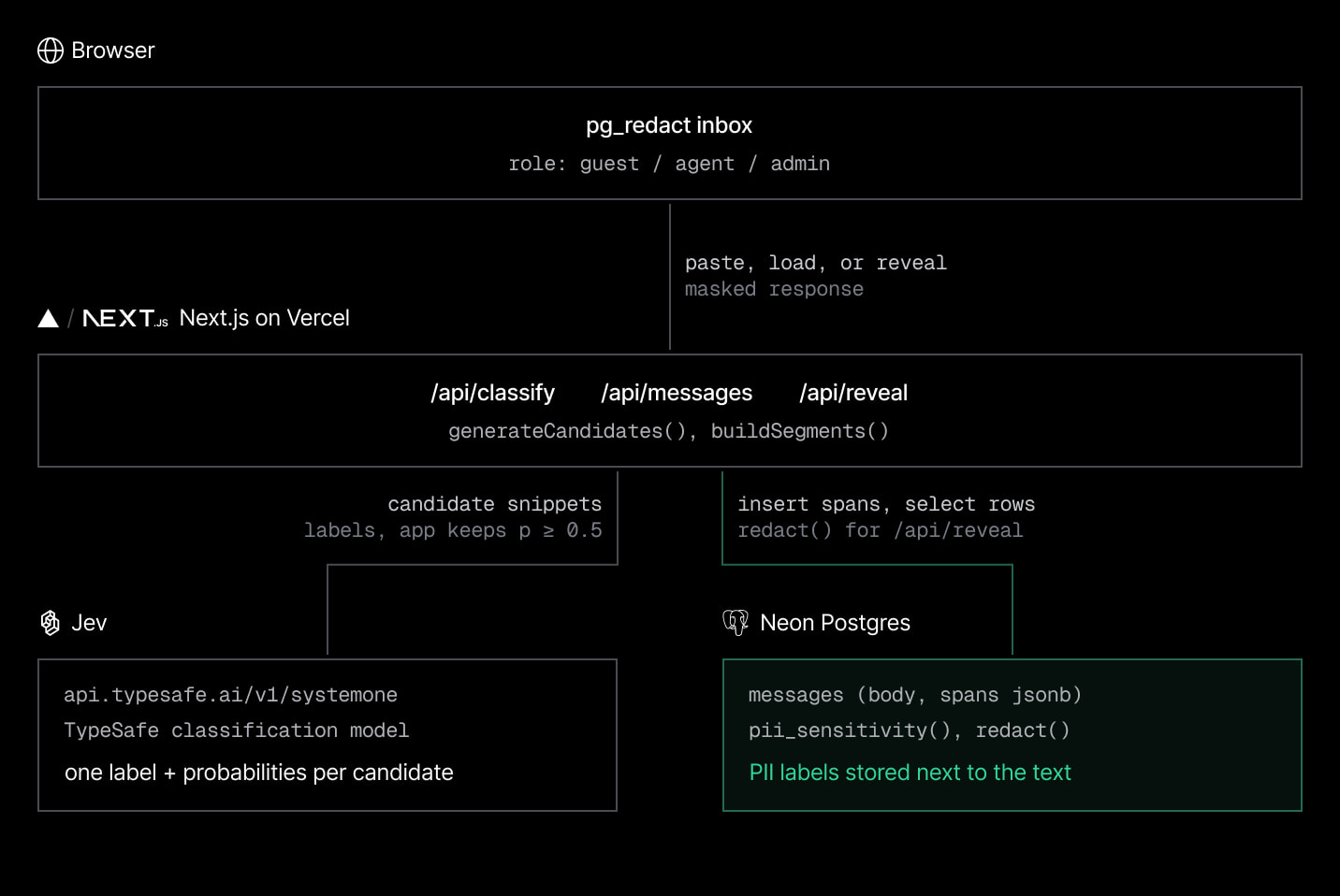
Under the hood, pg_redact has three pieces:
- Candidate generation, which uses simple regex and tokenization rules to find snippets that could be PII
- Jev, which decides for each snippet whether it's personal data, and what kind, with a calibrated probability
- Neon, which stores each message and its classified spans as JSONB, with a redact() SQL function that seals or reveals each snippet based on the viewer's role
In this post, I'll walk you through each piece of the pg_redact's architecture. You can check out all the code here: https://github.com/rishi-raj-jain/pg-redact.
How pg_redact works
1. Generating candidates
Before Jev can classify anything, pg_redact needs a list of snippets. generateCandidates() builds that list in a few passes, starting with regex for structured shapes (source):
const MAX_CANDIDATES = 40

const STRUCTURED: RegExp[] = [
  /[A-Za-z0-9._%+-]+@[A-Za-z0-9.-]+\.[A-Za-z]{2,}/g, // email
  /\+?\d[\d\-.\s()]{6,}\d/g, // phone-ish runs
  /\b\d{3}-\d{2}-\d{4}\b/g, // SSN
  /\b(?:\d[ -]?){13,16}\b/g, // card-ish
  /\b\d{1,2}\/\d{1,2}\/\d{2,4}\b/g, // dates
  /\b\d{5,}\b/g, // long digit runs
  /@[A-Za-z0-9_]{2,}/g, // handles
]
It then tokenizes the message and adds runs of capitalized words that could be a name or a place (like "Daniel Brooks"), runs starting with a number that could be a street address, and backfills with any other tokens, up to 40 candidates per message. This step never decides what's PII. In the support ticket above, both 88213 and 402-11-9931 match a pattern, so both go to Jev as candidates.
2. Classifying with Jev
Each candidate then goes to Jev. Jev is TypeSafe's System One model, where you send a state (here, the message text) along with a set of typed questions, and get typed answers with calibrated probabilities back in a single API response.
The labels Jev can pick from are defined once in JEV_CRITERIA, with a short description for each option that Jev reads along with the question:
export const JEV_CRITERIA: Record<PiiType | 'none', string> = {
  email: 'an email address',
  phone: 'a phone or fax number',
  name: "a specific person's name",
  address: 'a physical or mailing address',
  id_number: 'a government id, financial account or card number, SSN, or date of birth',
  none: 'not personally identifiable information',
}
classify() then asks one choice question per candidate snippet, and Jev evaluates all of them in the same request:
const questions: Record<string, unknown> = {}
candidates.forEach((c, i) => {
  questions[`q${i}`] = {
    type: 'choice',
    instructions: `In the text, classify the span "${c}". Pick "none" unless it identifies a specific real individual.`,
    criteria: JEV_CRITERIA,
  }
})

const res = await fetch('https://api.typesafe.ai/v1/systemone', {
  method: 'POST',
  headers: {
    Authorization: `Bearer ${process.env.TYPESAFE_API_KEY}`,
    'Content-Type': 'application/json',
  },
  body: JSON.stringify({ model: 'jev-latest', state: text, questions }),
})
Jev answers each question under the same key it was asked with (q0, q1, and so on). Every answer carries the winning choice and a probability for each option (source):
type ChoiceAnswer = {
  type: 'choice'
  choice: string
  confidence: number
  probabilities: Record<string, number>
}

type JevResponse = {
  model: string
  answers: Record<string, ChoiceAnswer>
}
pg_redact then turns those answers into snippets. It skips anything that is labeled as none, and only keeps a snippet when the winning probability is at least 0.5. This filters out the low-confidence guesses before anything is written to Postgres (source):
const data = (await res.json()) as JevResponse

const bestByText = new Map<string, Span>()
candidates.forEach((c, i) => {
  const a = data.answers[`q${i}`]
  if (!a || a.choice === 'none') return
  const type = a.choice as PiiType
  const conf = a.probabilities?.[a.choice] ?? a.confidence ?? 0
  if (conf < CONF_THRESHOLD) return // 0.5
  const existing = bestByText.get(c)
  if (!existing || conf > existing.conf) bestByText.set(c, { text: c, type, conf })
})
For the Daniel Brooks ticket, these are the snippets Jev labeled and pg_redact stored in the demo's database:
[
  { "text": "daniel.brooks@acme.co", "type": "email", "conf": 0.96 },
  { "text": "402-11-9931", "type": "id_number", "conf": 0.98 },
  { "text": "Daniel Brooks", "type": "name", "conf": 0.96 },
  { "text": "Daniel", "type": "name", "conf": 0.94 },
  { "text": "Brooks", "type": "name", "conf": 0.91 },
  { "text": "SSN", "type": "id_number", "conf": 0.89 }
]
The invoice number 88213 went to Jev as a candidate but didn't come back as PII, so it isn't stored and is readable by every role. Jev also labeled the word "SSN" itself as an id_number, so a Guest or a Support Agent doesn't see which kind of identifier is next to it.
3. Storing and enforcing in Postgres
With the labels ready, pg_redact needs a place to store them and a rule that uses them. npm run db:setup creates the messages table, where each message keeps its snippets in a JSONB column, in the same row as the text:
create table messages (
  id serial primary key,
  source text not null default 'seed',
  body text not null,
  spans jsonb not null default '[]'::jsonb,
  created_at timestamptz not null default now()
);
When someone pastes a new message in the demo, the classify route ties the three steps together. It generates candidates, sends them to Jev, and inserts the message along with its snippets in one statement (error handling trimmed):
const candidates = generateCandidates(body)
const result = await classify(body, candidates)

const [row] = await sql`
  insert into messages (source, body, spans)
  values ('pasted', ${body}, ${JSON.stringify(result.spans)}::jsonb)
  returning id, source, body, spans, created_at
`
Each snippet has the shape , i.e. the exact substring, the label Jev picked, and its confidence. pg_redact then uses two SQL functions (pii_sensitivity() and redact()) to decide what each role can see.
The first one, pii_sensitivity(), gives each PII type a rank:
create function pii_sensitivity(t text) returns int
language sql immutable as $$
  select case t
    when 'name' then 1
    when 'email' then 2
    when 'phone' then 2
    when 'address' then 3
    when 'id_number' then 3
    else 99
  end
$$;| PII type | Sensitivity |
|---|---|
| Name | low |
| medium | |
| Phone | medium |
| Address | high |
| ID / financial | high |
Each role then gets a clearance level to compare against that rank (source):
| Role | Clearance | Sees |
|---|---|---|
| Guest | 0 | Nothing |
| Support Agent | 2 | Name, email, phone |
| Admin | 3 | Everything |
A viewer can see a snippet when their clearance is greater than or equal to that snippet's sensitivity.
The second function, redact(), does that check. It goes through the stored snippets from longest to shortest and blacks out any snippet whose sensitivity is above the caller's clearance:
create function redact(in_body text, in_spans jsonb, in_clearance int)
returns text language plpgsql immutable as $$
declare
  rec record;
  result text := in_body;
begin
  for rec in
    select value as span
    from jsonb_array_elements(in_spans)
    order by char_length(value->>'text') desc
  loop
    if pii_sensitivity(rec.span->>'type') > in_clearance then
      result := replace(
        result,
        rec.span->>'text',
        repeat('█', greatest(char_length(rec.span->>'text'), 3))
      );
    end if;
  end loop;
  return result;
end;
$$;
You can run redact() yourself in the Neon SQL Editor. Here's the Daniel Brooks ticket at each clearance level:
select
  redact(body, spans, 0) as guest,
  redact(body, spans, 2) as agent,
  redact(body, spans, 3) as admin
from messages
where id = 2;
guest: Please credit invoice 88213 back to █████████████ at █████████████████████, whose ███ on file is ███████████.
agent: Please credit invoice 88213 back to Daniel Brooks at daniel.brooks@acme.co, whose ███ on file is ███████████.
admin: Please credit invoice 88213 back to Daniel Brooks at daniel.brooks@acme.co, whose SSN on file is 402-11-9931.Because redact() replaces the longest snippets first, "Daniel Brooks" becomes one 13-character bar before the shorter "Daniel" and "Brooks" entries can split it. And since storing the labels and enforcing them are separate steps, you can change a role's clearance or a PII type's sensitivity without requiring reclassification.
Proving that enforcement lives in the database
A demo like this could mask values in the API response and keep the rule in application code. The reveal route is there so you can see what Postgres itself computes. It takes a message ID and a role, and returns the string redact() produced for that role:
const clearance = clearanceFor(role) // guest 0, agent 2, admin 3

const [row] = await sql`
  select redact(body, spans, ${clearance}) as db_masked, spans
  from messages
  where id = ${id}
`
In the demo, expand what Postgres returns for this role under any message. When you switch roles, the app calls /api/reveal with the new clearance and shows you the string Postgres returns.
Try it
You can run it locally:
git clone https://github.com/rishi-raj-jain/pg-redact
cd pg-redact
npm install
cp .env.example .env   # fill in DATABASE_URL and TYPESAFE_API_KEY
npm run db:setup       # create the table plus pii_sensitivity() and redact()
npm run db:seed        # classify the seed messages through Jev and insert them
npm run dev            # http://localhost:3000
You can also open the demo and try switching roles yourself. If you're building something similar, point your coding agent at the repository and reuse the same setup in your own app.