



A photo library has basically four kinds of data:
- Files: the original photos and face crops, kept in a private object storage bucket and shown through short-lived presigned URLs.
- Metadata: each photo's object key, dimensions, caption, and upload time, stored in Postgres.
- Vectors: CLIP embeddings to search by a phrase or a similar image, and face descriptors grouped into people, also in Postgres.
- Identity: the users and sessions that authentication creates, plus an owner ID on every row so each user only sees their own photos.
Even if this is a simple app concept, in practice there are quite a few elements to work out together every time you want to try a change. To test a new search query or schema change against real photos, a preview needs the production images and data, the vectors that match them, and real users to sign in as. Getting all of that into a preview environment requires code changes (especially for authentication), and copying images for even a mid-sized library can take longer than the change you wanted to test.
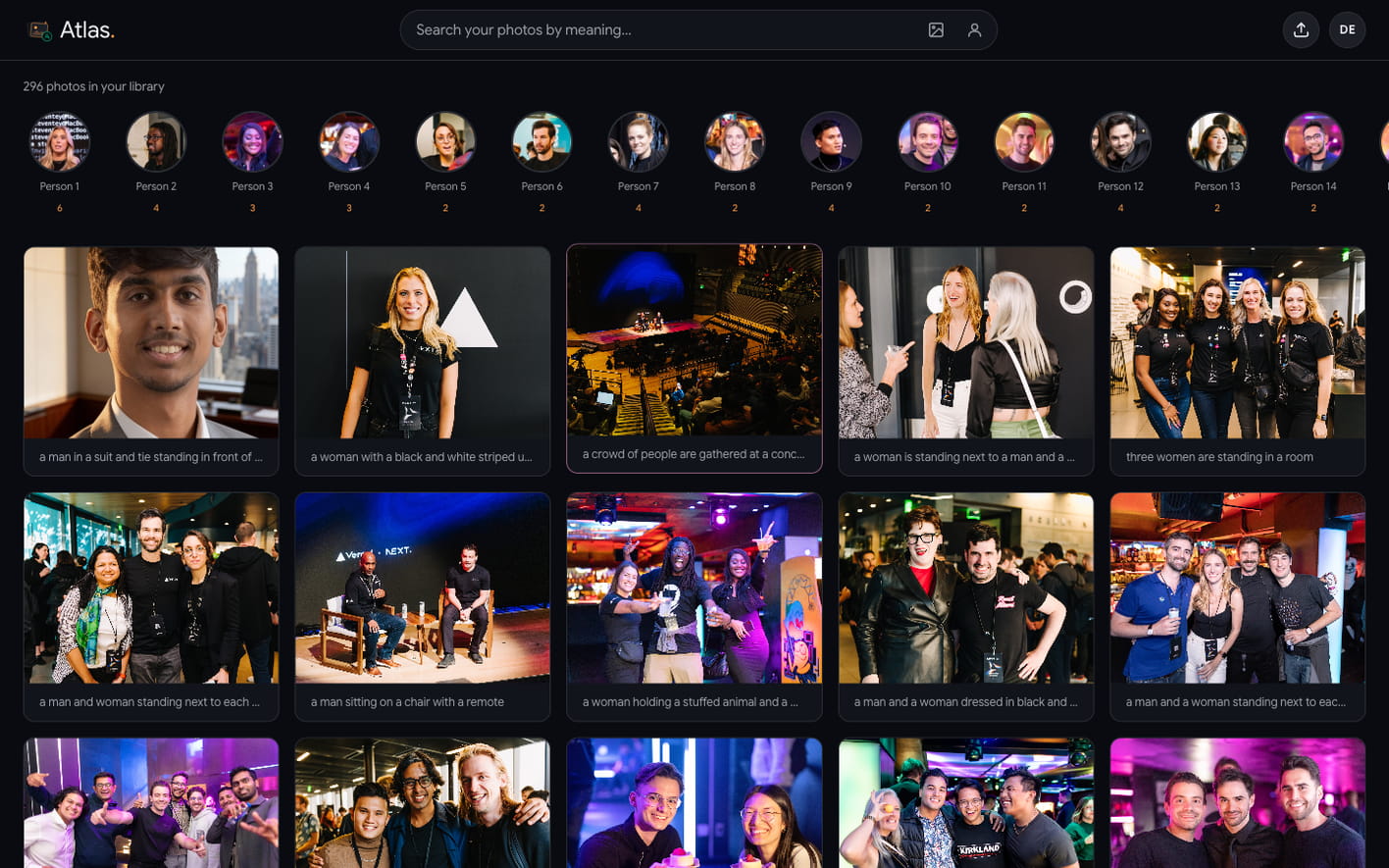
I built Atlas to demonstrate how this is very simple to solve with the Neon backend. Atlas is a TanStack Start app on Vercel where you can:
- upload a private photo library, with captions generated automatically
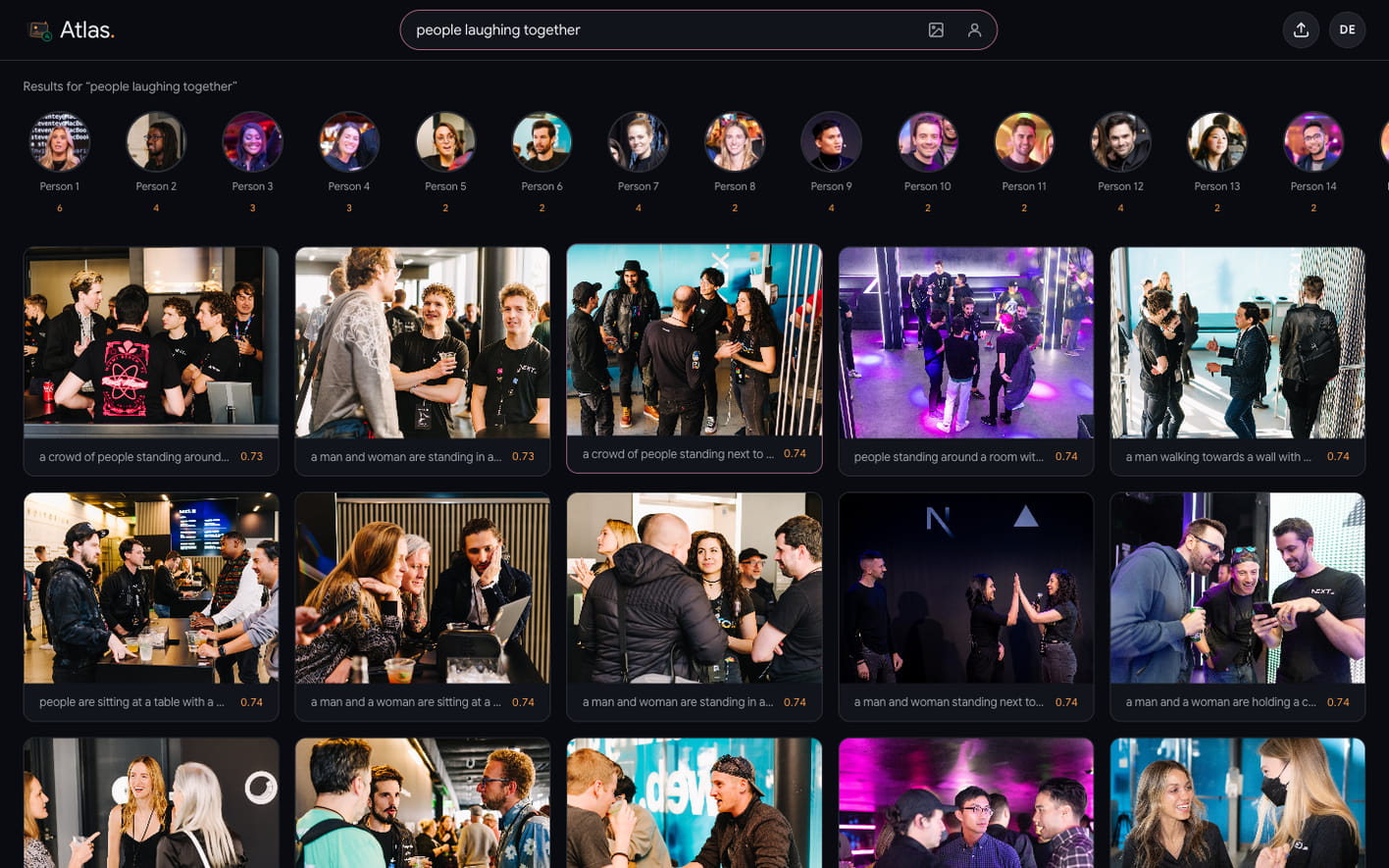
- search it with a phrase such as "people laughing together"
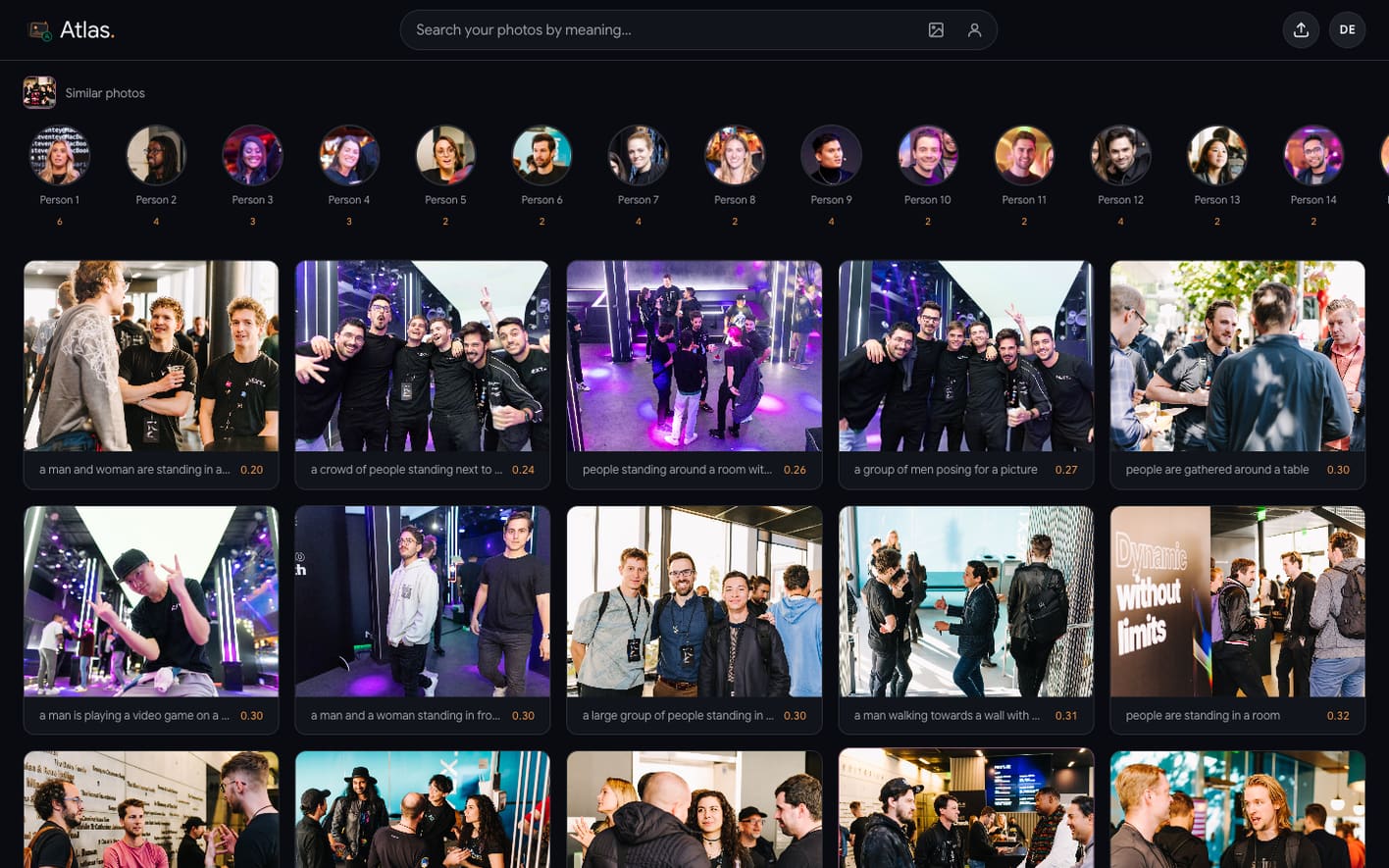
- upload an image, or pick any photo in your library, to find visually similar shots
- upload a face to find that person across the library
- browse people grouped automatically from the faces in your photos
Check out the code in this repository.
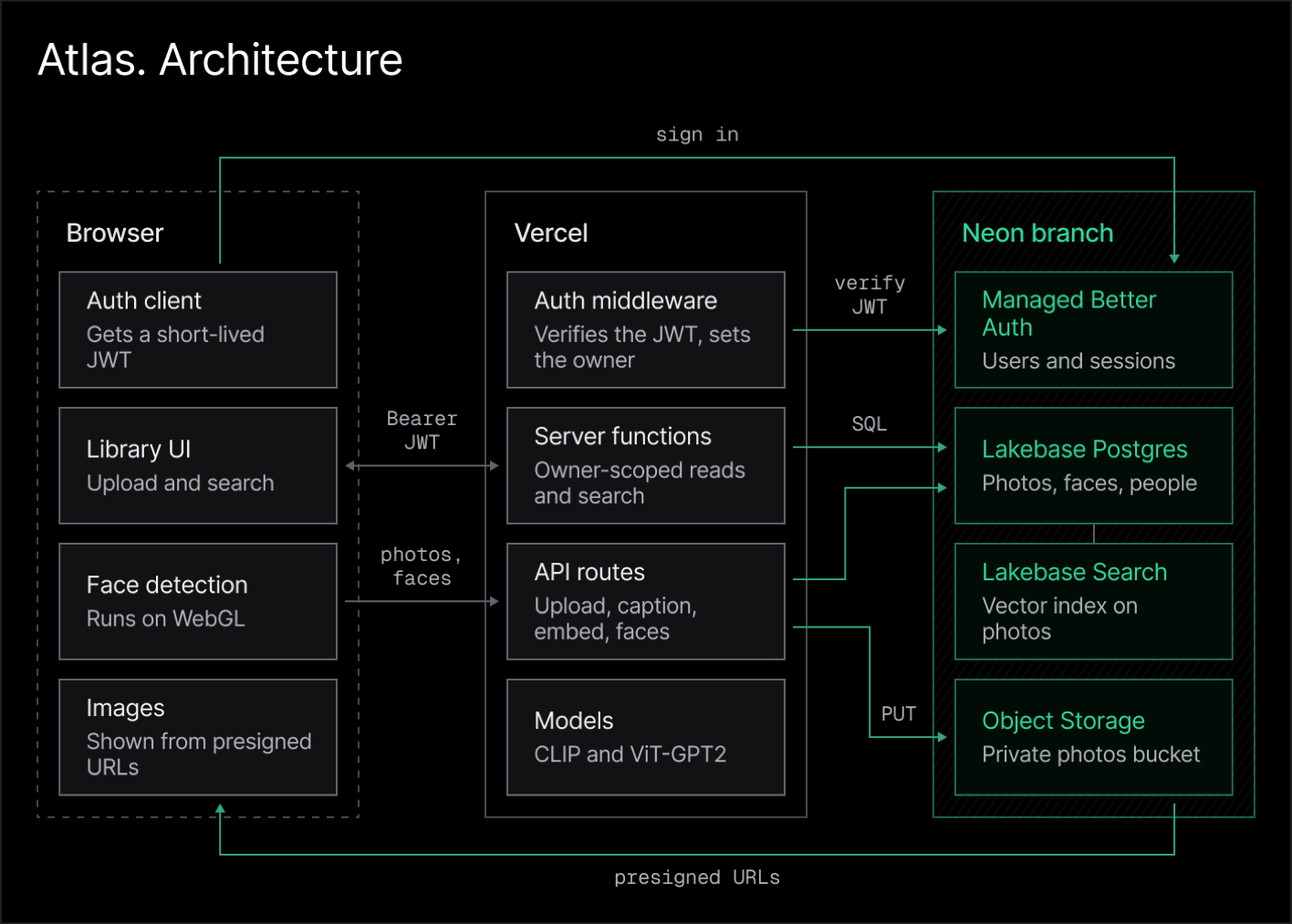
Atlas uses four primitives from the Neon backend:
- Lakebase Postgres to store photo metadata, ownership, captions, embeddings, and face descriptors
- Object Storage to store the original images and face crops in a private bucket
- Managed Better Auth to sign users in and give the backend an identity for every request
- Lakebase Search to rank image embeddings inside Postgres
As we’ll see later in this post, what makes workflows much simpler is that these are all Neon backend primitives, so they speak the same semantics - they all branch. Creating a live preview that directly reflects production is as simple as creating a Neon branch. The photo metadata, the objects those rows point at, the users and sessions, and the search indexes all come with it. You sign in through the same auth flow, see that user's photos through short-lived presigned URLs, and upload or search without reading from or writing to production.
The Neon backend is composable
Atlas deliberately does not use all the primitives in the Neon suite: APIs are hosted on Vercel, so it does not need Neon Functions. It runs CLIP, captioning with transformers.js and face detection in the browser instead of calling the AI Gateway. Reads and writes go through TanStack server functions, so it does not use the Data API.
How Atlas is built
Atlas is a TanStack Start app on Vercel. The sections below cover how it declares the backend, uploads and stores the photos in a private bucket, searches from them based on face, image or text.
Declare the backend in neon.ts
Atlas declares Auth and the private photos bucket in neon.ts. The Neon CLI provisions both on any branch you link:
import { defineConfig } from '@neon/config/v1'

export default defineConfig({
  auth: true,
  preview: {
    buckets: {
      // Served through short-lived presigned URLs, so no anonymous reads
      photos: { access: 'private' },
    },
  },
})
You can then run the following commands to link a project, provision resources, and write the credentials to .env:
neon link                    # link or create a Neon project
neon deploy                  # provision Auth and the photos bucket
neon env pull --file .env    # DATABASE_URL, NEON_AUTH_JWKS_URL, AWS_* storage vars
Store photos in a private bucket
Neon Object Storage is S3-compatible, so the AWS SDK, boto3, and the AWS CLI all work with it. Atlas only needs to upload, delete, and sign requests, so it uses aws4fetch, a lightweight SigV4 client built on fetch. Atlas reads the endpoint from AWS_ENDPOINT_URL_S3 and addresses objects path-style, as <endpoint>/<bucket>/<key>.
// Simplified from the repository
import { AwsClient } from 'aws4fetch'

const client = new AwsClient({
  accessKeyId: process.env.AWS_ACCESS_KEY_ID!,
  secretAccessKey: process.env.AWS_SECRET_ACCESS_KEY!,
  service: 's3',
  region: process.env.AWS_REGION ?? 'us-east-2',
})

const objectUrl = (key: string) => `${process.env.AWS_ENDPOINT_URL_S3}/photos/${key}`

export async function putImage(key: string, body: Uint8Array, contentType = 'image/jpeg') {
  const res = await client.fetch(objectUrl(key), {
    method: 'PUT',
    body,
    headers: { 'content-type': contentType },
  })
  if (!res.ok) throw new Error(`PUT ${key} failed: ${res.status}`)
}
The upload route first writes the image bytes to the bucket, then inserts a Postgres row that stores the object key. If the upload fails, Atlas never creates a row that points at a missing object:
const uid = await requireUser(request) // owner comes from the verified JWT
const bytes = new Uint8Array(await file.arrayBuffer())
const { embedding, width, height } = await embedImageBytes(bytes, file.type)

const id = crypto.randomUUID()
const filename = `${id}.jpg`

await putImage(filename, bytes, file.type) // 1. bytes into the bucket
await db.insert(photos).values({            // 2. the row that points at them
  id,
  ownerId: uid,
  filename,
  width,
  height,
  embedding: toVector(embedding),
})
Similarly, Atlas stores face crops in the same bucket under a faces/ prefix.
Serve images with presigned URLs
Because the bucket is private, the browser cannot read objects directly. To display a photo, the server signs a GET URL for that object, which grants read access for one hour:
export async function imageUrl(key: string, expiresIn = 3600) {
  const url = new URL(objectUrl(key))
  url.searchParams.set('X-Amz-Expires', String(expiresIn))
  const signed = await client.sign(url.toString(), { method: 'GET', aws: { signQuery: true } })
  return signed.url
}
Each server function signs the image URLs, so the browser gets everything it needs to render the photos in a single request and can place each URL directly in an <img> tag.
Model photos, faces, and people in Postgres
Postgres in Atlas holds the data that makes each photo searchable and private: its owner, caption, and vectors. Atlas uses Lakebase Postgres, which scales compute to zero when idle, autoscales under load, and branches with copy-on-write. It defines the schema in Drizzle, and since pgvector's vector(n) type has no built-in Drizzle column, it uses the customType:
const vector = (dimensions: number) =>
  customType<{ data: string; driverData: string }>({
    dataType: () => `vector(${dimensions})`,
  })

export const photos = pgTable(
  'photos',
  {
    id: text('id').primaryKey(),
    ownerId: text('owner_id'),            // Auth user id, from the verified JWT
    filename: text('filename').notNull(), // object key in the bucket
    width: integer('width').notNull().default(0),
    height: integer('height').notNull().default(0),
    embedding: vector(512)('embedding').notNull(), // CLIP image vector
    caption: text('caption'),
    createdAt: timestamp('created_at', { withTimezone: true }).notNull().defaultNow(),
  },
  // Serves one owner's newest-first grid from a single index
  (t) => [index('photos_recent_idx').on(t.ownerId, t.createdAt.desc())],
)
In Atlas, two more tables hold the face data:
facesstores a 1024-d descriptor, a bounding box, and the object key of each face crop.peoplestores the groups built from those faces, with a cover crop and a face count.
Scope every request to the signed-in user
Each library must be visible only to its owner. Atlas enforces this with one rule: the server sets the owner of every row from the verified token. Managed Better Auth stores users and sessions in the neon_auth schema, in the same database as the photos. After sign-in, the browser exchanges its session for a short-lived JWT and sends it as a Bearer token. A TanStack middleware attaches the token on the client and verifies it on the server:
export const authMiddleware = createMiddleware({ type: 'function' })
  .client(async ({ next }) => next({ headers: { Authorization: `Bearer ${await getToken()}` } }))
  .server(async ({ next }) => next({ context: { userId: await requireUser(getRequest()) } }))
requireUser verifies the token against the Auth JWKS with jose and returns its sub. Every server function then reads the owner from that context:
// Simplified from the repository
export const listPhotos = createServerFn({ method: 'POST' })
  .middleware([authMiddleware])
  .inputValidator((d: { offset: number; limit: number }) => d)
  .handler(async ({ data, context }) => {
    const rows = await db
      .select()
      .from(photos)
      .where(eq(photos.ownerId, context.userId))
      .orderBy(desc(photos.createdAt))
      .limit(data.limit)
      .offset(data.offset)
    return withUrls(rows) // sign each object key before returning
  })
The /api routes for uploads, captions, and faces call requireUser the same way, so a modified request cannot read or write another user's photos. Atlas enforces this in SQL inside its server code. An app that exposes Postgres through the Data API can enforce the same boundary with Row Level Security. The Neon backend supports both.
Search by meaning with Lakebase Search
Lakebase Search adds the lakebase_ann vector index to Postgres. Neon stores the index in object storage and attaches compute to it independently, while your queries keep using the standard vector type and <=> operator. Atlas builds the index once after seeding:
create index photos_embedding_ann on photos
using lakebase_ann (embedding vector_cosine_ops)
with (build_mode = 'standard');
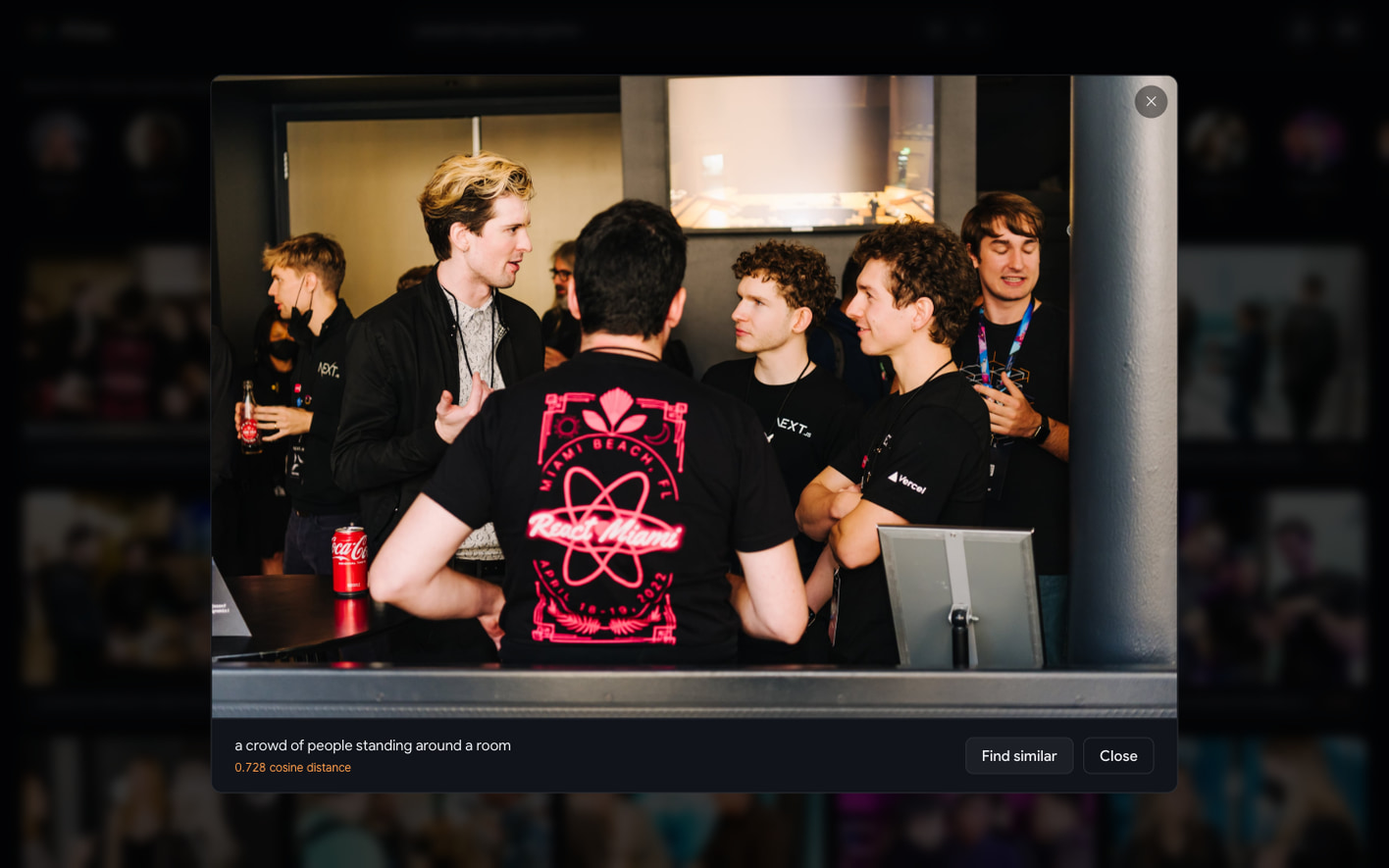
For a text search, Atlas embeds the phrase with CLIP's text model, into the same 512-d space as the images, and ranks the user's photos with a single query that combines the ownership filter and the vector ranking:
const { rows } = await db.execute(sql`
  select id, filename, caption, width, height,
         (embedding <=> ${q}::vector) as distance
  from photos
  where owner_id = ${uid}
  order by embedding <=> ${q}::vector
  limit ${limit}
`)
Drizzle's query builder can't express <=>, so ranking queries use a raw sql fragment. Image search runs the same query with a different vector. Atlas passes an uploaded image through CLIP's vision model, and Find similar reuses a stored photo's embedding.
Find people by face
Face search requires a different vector than scene search. CLIP describes the contents of a whole photo, while a face descriptor identifies the person in it. Atlas detects faces in the browser with @vladmandic/human on WebGL. On upload, the browser crops each face, computes a 1024-d descriptor, and posts both to /api/faces. The server stores the crops in the bucket, inserts the face rows, and regroups that user's faces into people with Chinese Whispers clustering.
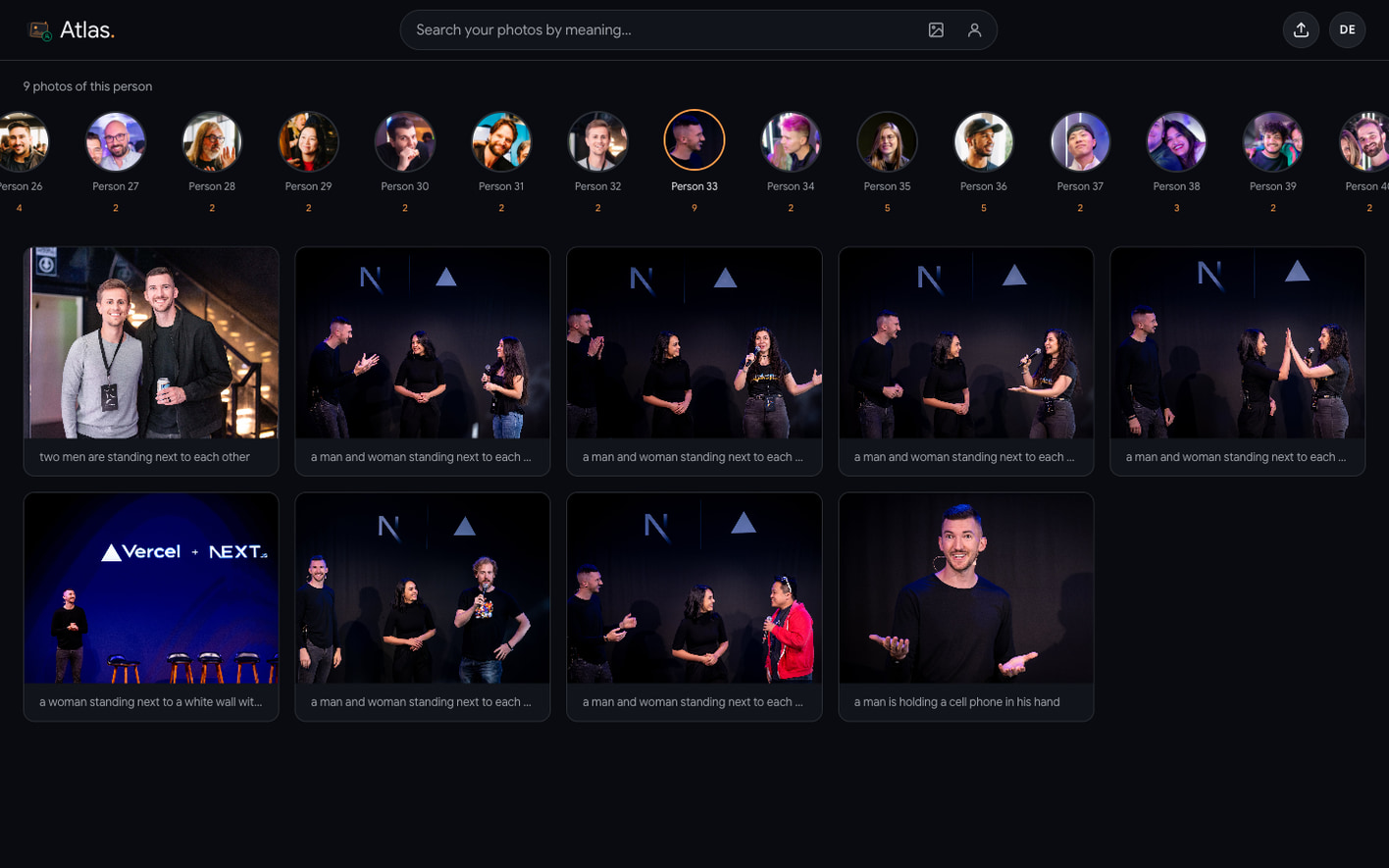
To search by face, Atlas ranks each photo by its closest face to the query descriptor:
select p.id, p.filename, p.caption,
       min(f.embedding <=> $1::vector) as distance
from photos p
join faces f on f.photo_id = p.id
where p.owner_id = $2 and f.owner_id = $2
group by p.id, p.filename, p.caption
order by distance
limit 48;
The faces table has no ANN index, so Postgres runs an exact scan over one user's faces.
A preview that includes the whole backend
The application becomes truly interesting when it has more than one environment. If we wanted a preview for Atlas, creating a Neon branch (it’s one API call) branches the whole backend in seconds, without copying data up front:
neon checkout dev-atlas- Lakebase Postgres branches with copy-on-write, so the preview has a full copy of the data (without actually duplicating the database).
- Object Storage also branches with copy-on-write, giving the preview an isolated view of the buckets and objects where you can change files without affecting production.
- Managed Better Auth branches with the database, including the users and sessions in the
neon_authschema. - Lakebase Search indexes stay available on the branch without a rebuild.
For Atlas, each preview therefore contains:
- the photo rows, with their captions and CLIP embeddings
- the face descriptors and the people groups built from them
- the private photos and face crops those rows reference
- the users and sessions needed to test sign-in and access
- the
lakebase_annindex used by text and image search
Run Atlas and start building
Try the live demo or clone the Atlas example and connect it to your own Neon project. You can also check out our getting started docs or start experimenting with your agent. We’re in Discord if you have any questions!