



Staging environments drift. The fix is obvious: refresh staging from production regularly. The problem is that “regularly” and “multi-hour database copy” don’t mix well.
Three traditional approaches
pg_dump / pg_restore
This simple route works for small databases and not critical workloads, e.g. a database around 10 GB that only requires infrequent refreshes.
The classical way of copying your database is via pg_dump and pg_restore: You dump your production database and restore it to staging. The main advantages of this method are its simplicity and the fact that it leverages tools already built into Postgres, i.e., no extra tooling is needed, and it technically supports databases of any size, albeit at a slow pace. This makes it approachable for most teams regardless of their setup.
But the drawbacks are also clear:
- Restoring from a dump means your staging environment is unavailable until the restore completes
- The process can drag on for hours – multi-terabyte databases make this approach almost unfeasible
- You need enough disk space to hold the dump files themselves
- Every refresh is a complete dump, you can’t sync just what changed since the last refresh
- This process tends to break in subtle ways
Logical replication
Logical replication might work well, but only if you’re comfortable manually managing schema/config changes and replication health over time.
Postgres’s built-in logical replication keeps table data in your staging environment continuously synced with production:
-- On production
CREATE PUBLICATION prod_pub FOR ALL TABLES;

-- On staging
CREATE SUBSCRIPTION staging_sub
  CONNECTION 'host=production-host dbname=mydb user=replication_user'
  PUBLICATION prod_pub;
This is nice in many ways:
- Near real-time data sync – production writes show up in staging quickly
- Replication runs continuously without taking staging offline
- You can choose which tables to replicate
But it’s important to be precise about what logical replication does not do. Logical replication does not replicate schema or configuration changes, meaning that schema changes must be applied manually to staging. This often leads to schema drift even if data drift is solved.
Logical replication can also get quite costly, since it adds continuous load to your production database. It also requires careful management of replication slots and ongoing monitoring to catch lag or failures before they silently accumulate (anyone who’s dealt with logical replication knows this takes real oversight).
AWS Database Migration Service (DMS)
DMS can work if you’re already deep in AWS and want a managed way to replicate data without running your own pipelines, and are ok keeping an eye on schema/configuration changes.
This is not Postgres-native like the previous two approaches, but if you’re on AWS, DMS provides a managed service for database migration and replication. DMS can apply basic schema changes during initial migrations and can transform data if your staging schema differs from production, but in ongoing replication setups, schema evolution is not automatically or fully handled.
In summary, the trade-offs:
- This is only viable if you’re already in the AWS ecosystem
- It comes with additional costs
- DMS connects directly to your source database, which can affect production performance
- Data stays in sync, but schema and configuration drift can still creep in over time
The problem: drift or downtime
All of the traditional approaches above break down for the same fundamental reason – they’re trying to move data instead of treating the database as a versioned system.
Methods based on logical replication (including tools fundamentally built on top of it like DMS) are good at keeping rows in sync, but they don’t keep the database itself in sync. At the other extreme, pg_dump and pg_restore do give you a clean reset, but once your database grows past a certain size, full dumps take hours and become impractical.
On top of that, every one of these approaches blindly copies production data, including PII. This creates immediate compliance and access problems in non-production environments. You can bolt on anonymization scripts afterward, but now you’re stacking slow operations on top of fragile workflows.
Database branching for staging
If you’re using a Postgres platform that supports database branching (like Neon), you have a new option: instead of thinking about copying data from two separate production and staging instances, you think about branching your production database when you need a staging environment.
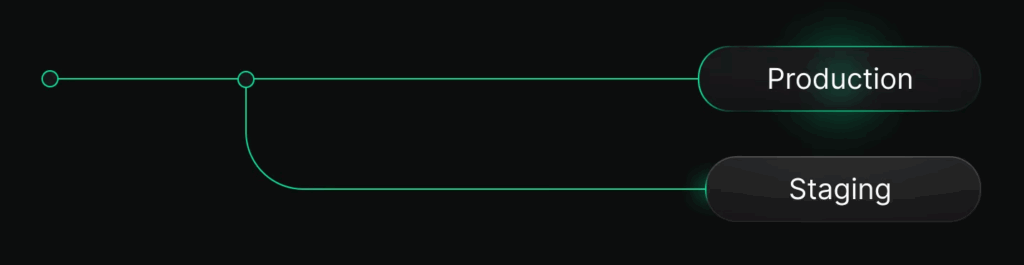
Staging as a branch
Your staging environment becomes a branch of your production database. Creating branches is instantaneous in platforms like Neon, so you don’t have to wait when this happens – this is true no matter how large your production database. When you need to refresh staging, you reset it to the current state of production (this is also instant, because it’s using copy-on-write technology at the storage layer).
# Reset staging branch to match current production state
neon branches reset staging --parent main
Anonymized branches for PII compliance
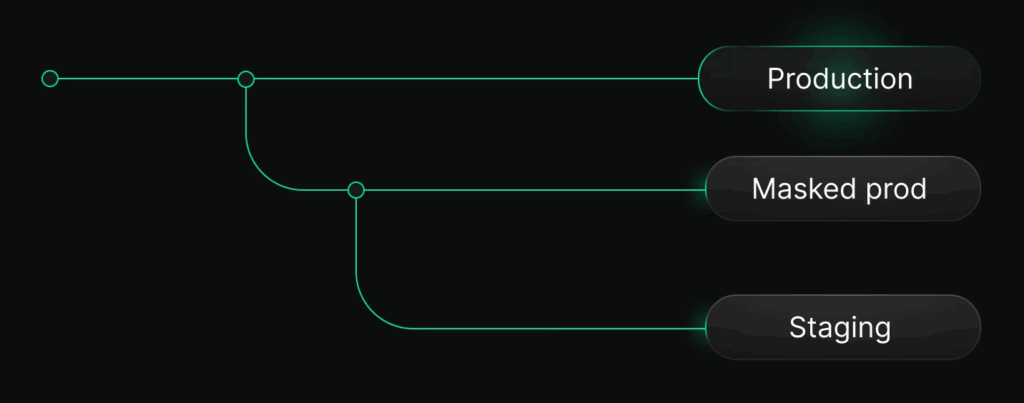
If your staging environment can’t contain production PII, Neon lets you build anonymization directly into your branching workflow. Instead of branching staging straight from production, you first create an anonymized branch from prod. Neon applies masking rules to sensitive columns like emails, names, phone numbers, and custom fields, replacing them with realistic synthetic values while preserving schema, data types, and relationships. You can then simply derive staging (and dev) branches from this anonymized version of prod.
When branching is a game changer
The key advantage of Neon’s branching is that operations that used to take hours and involve manual work (dumping, restoring, re-masking, resyncing) become fast, repeatable actions you can run as often as you need.
Having access to branching workflows start to matter the moment staging stops being something you think about once in a while and becomes something you rely on every day. It’s especially valuable if,
- Your database is large. When dumps take hours or full copies are no longer realistic, branching lets you refresh staging instantly, regardless of size
- You need to refresh staging frequently. Daily or even per-deploy refreshes become practical because resets are fast and non-disruptive
- You run more than one test environment. Staging, QA, and preview environments can all exist at the same time without copying data
- You want to test migrations reliably. Every branch starts from the exact production schema and data state, so migrations behave the same way they will in prod
- You have a larger team or parallel CI. Multiple engineers or test runs can each have isolated, production-like databases without stepping on each other
- You’ve resorted to mocked or stale data because of PII concerns. Branching combined with anonymization lets you test against realistic data without exposing customer information
The case against copying
As databases grow and privacy requirements tighten, the old model of “copy production to staging” starts to break down. Database branching changes that trade-off by treating the database as a versioned system. Refreshing staging stops being a rare, disruptive event and becomes a fast, repeatable operation you can automate and rely on.
More than 400k branches are created in Neon every day by teams just like yours. If you want to take a peek at the most common workflows, check out our Practical Guide to Database Branching. You can try all of this yourself on Neon’s Free Plan.