



Branching is one of the most loved features by Neon users (they create ≈500k branches per day on our platform). But because branching is still a relatively new concept for databases, it can take a moment to click. This guide skips the theory and focuses on what Neon users actually do with branching in practice, to illustrate better why teams love it – and so you can start using it yourself.
First, The Basics
Before jumping into it, there ar e just a few core things about how branching works in Neon that you’ll need to understand so the workflows below make sense. Here they are:
Branches don’t duplicate your data
When you create a branch, Neon takes the exact state (schema + data) of the parent branch at that moment, but it doesn’t copy the entire database. Thanks to copy-on-write storage, branches share the same base and only store changes. That’s why they’re fast to create and affordable.
Branches diverge independently
Once created, a branch becomes its own isolated environment. You can run migrations, load test data, experiment, or break things completely without touching the parent.
Branches are instant
Because nothing is duplicated, creating a branch takes a second no matter what. This makes it feasible to create many branches frequently and programmatically, e.g. per pull request or per test run.
Branches have their own compute
Every branch gets its own independent autoscaling compute endpoint. That means no noisy neighbors and no chance of other environments cannibalizing production resources, each branch scales on its own.
Branches scale to zero
Most non-production branches sit idle most of the time. Neon automatically scales their compute down to zero when they’re not being used, saving you costs, and resumes them automatically (millisecond coldstarts) when activity comes back.
Branches are fully programmable
You can create, delete, or reset branches via the Neon AP I, CLI, GitHub Actions, Vercel… Most teams end up implementing automation in one way or another to spin branches up and clean them up as part of their CI workflows.
Branches restore instantly
Because Neon preserves all history, you can instantly create a branch from any previous point in time within your restore window. This makes it easy to recover dropped tables, inspect past data, or debug issues without ever rolling back production.
Your Branching Workflow Menu
Now that the basics are covered, here’s the part you care about – how branching is actually used in practice. In the sections below, we cover the most useful patterns across developers first starting with Neon.
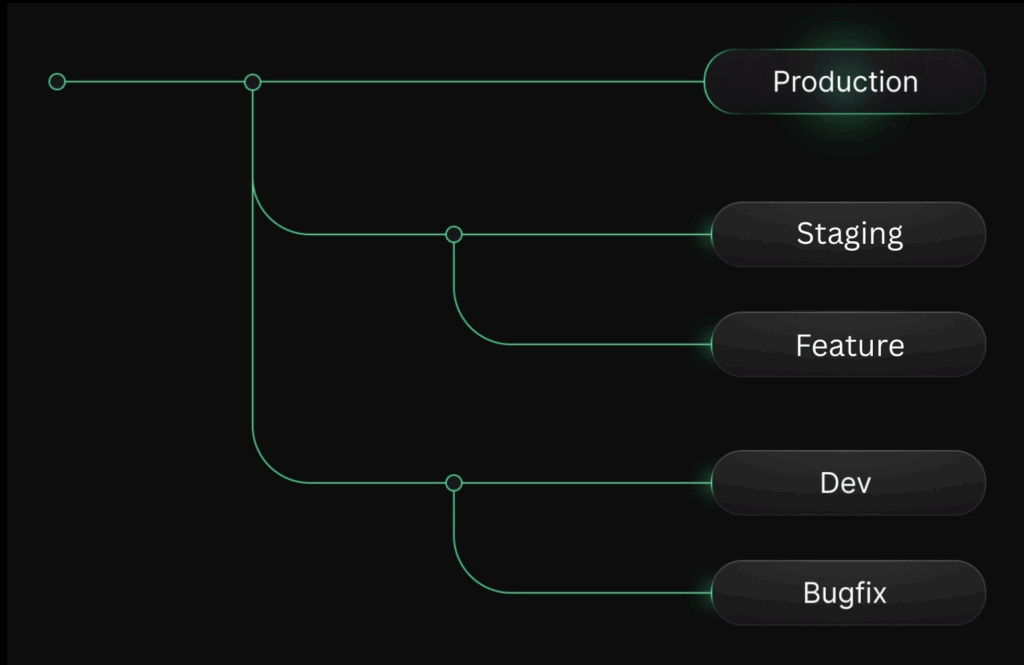
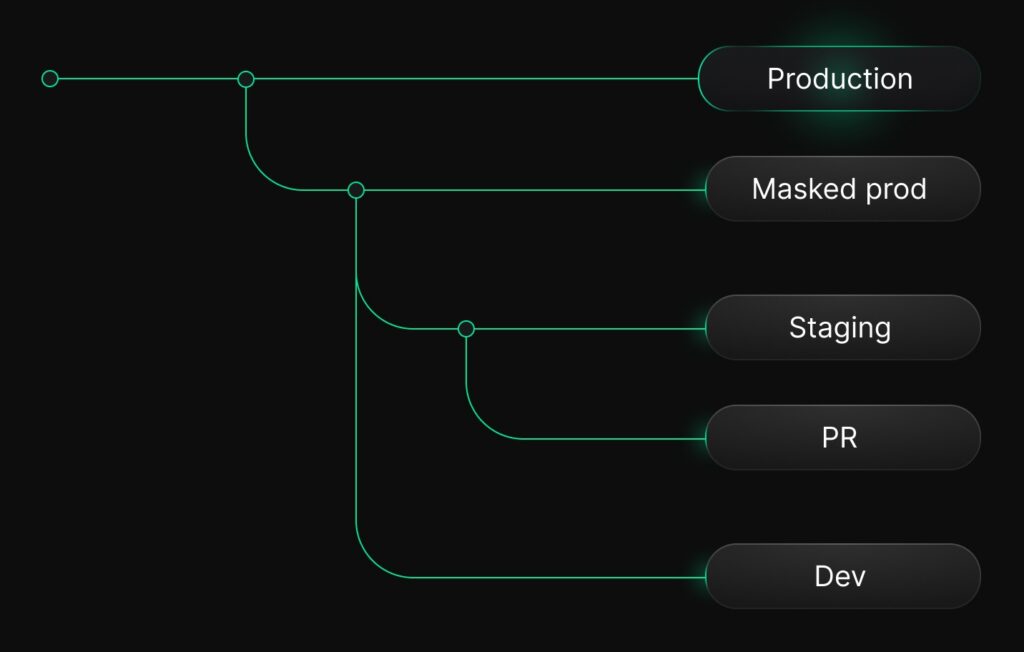
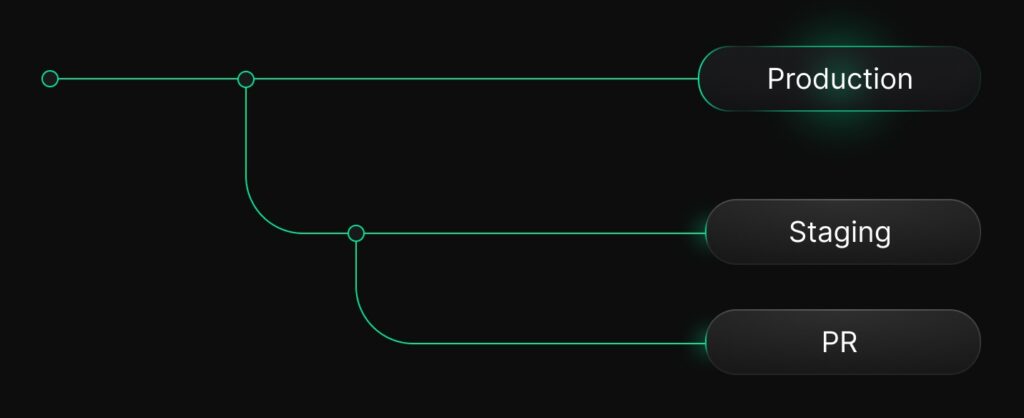
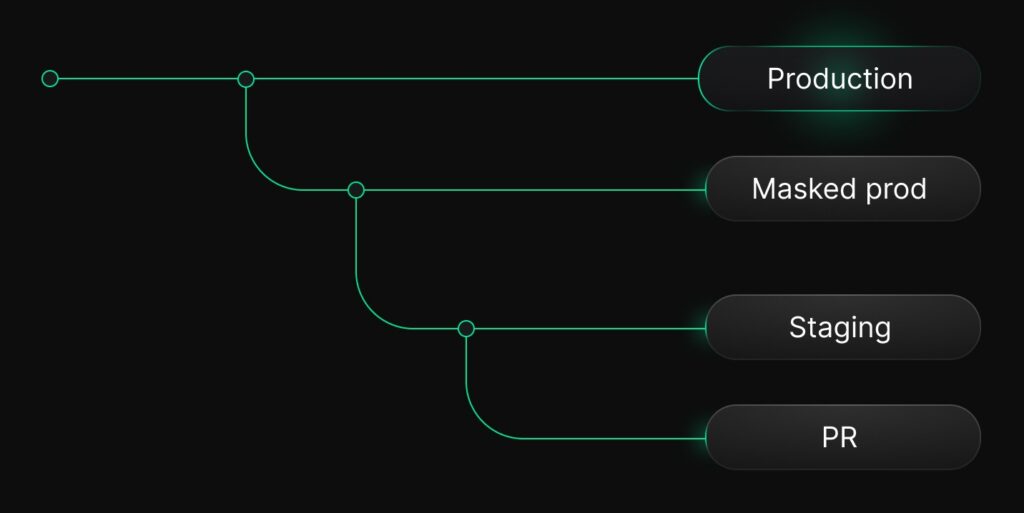
Here’s an eye side view of you your branch hierarchy would look like if you implemented them all:
- If you don’t have PII (most common workflow):
- If you have PII:
The workflow above is still in beta
The workflow with PII requires the use of anonymized branches (in beta). Use with discretion until they reach GA.
Production
Your first branch: the production branch

Your production branch is the source of truth for your application. On Neon, it’s “just a branch” – the parent branch in your project, but it’s the one that everything else depends on. Most other branches in your environment will derive from it or interact with it in some way.
Production branch: best practices
- Make production a protected branch.This will prevent any accidental deletions or resets.
- Understand credential isolation for child branches. There’s an important security behavior to know: When you create a child branch from a protected production branch, Neon automatically generates new database credentials for the child branch. This means that dev, staging, and preview branches cannot reuse production credentials, and connections in non-production branches are physically isolated.
- Avoid manual experimentation on production. Use branches for all schema changes, test data, or debugging (we’ll cover these workflows next).
Staging
Now let’s jump into the first common environment to create after production: staging. In Neon, staging is also just a branch, but there are two ways to create it depending on the structure and requirements of your data.
Staging branch derived directly from production (no PII)
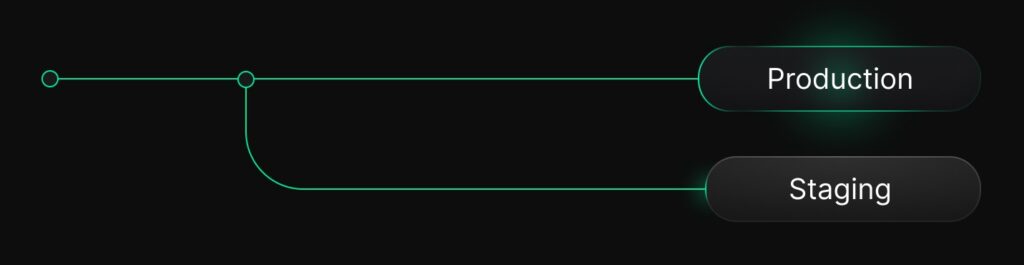
If your production data doesn’t contain PII, the simplest approach is to create a single, relatively long-lived* staging branch derived directly from your production branch:
- The branch captures your exact production state (schema + data) at the moment you branch. When it’s time to resync it with production (you’ll do it regularly), neon makes this extremely easy – see the “Staging best practices” section below.
- This branch is fully isolated, with its own independent compute (e.g. you can size it with less capacity than production) and scales to zero when idle.
What we mean by relatively long-lived: You’ll still have to resync this branch with production, even if you don’t delete it. This is very simple to do in Neon, you can just run a reset from parent action regularly to make sure your dev environment still reflects production accurately.
Staging as an anonymized branch (if you have PII)
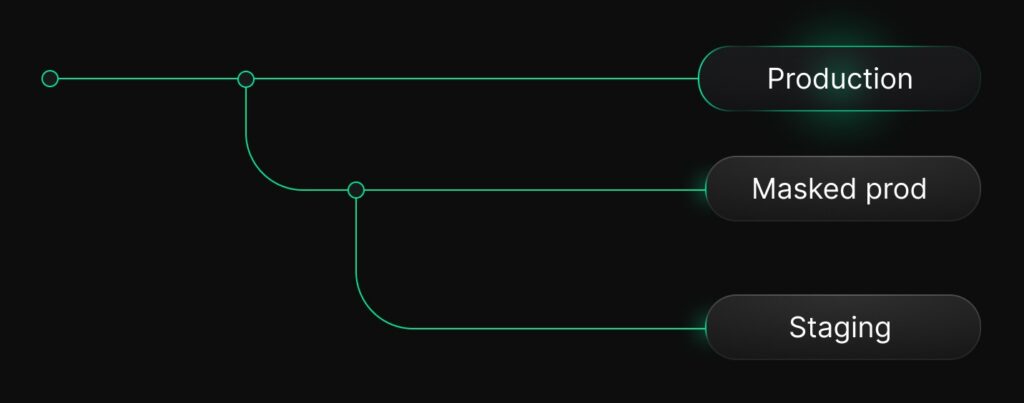
If your production data does contain PII, the recommended approach is to create an anonymized branch from production, and then derive staging from that branch:
- Neon will mask sensitive fields based on your masking rules
- You will get a staging environment that maintains realistic structure and distribution without exposing customer data
Anonymized branches are still in beta
This feature is still in beta: use with discretion. Also, consider these present limitations, which we’re working on fixing:
- Anonymized branches can’t reset to parent yet
- Masking options aren’t yet as extensive as what PostgreSQL Anonymizer offers, for example masking full street addresses
- You should avoid scenarios involving masking fields behind uniqueness, primary key, or non-nullable constraints
Staging best practices
- Keep staging fresh. Use reset branch to periodically bring staging in sync with production. This is especially helpful after running migrations or merging multiple features.
- Automate where it makes sense. E.g. teams often reset staging nightly or weekly, run schema validations on staging before deploys, or combine staging with PR-based branching workflows (below).
- Separate credentials by default. Set production as a protected branch. Child branches of protected production automatically receive new database credentials, so staging cannot accidentally access production data even if derived from it.
Development
Development environments are another must for daily software work. Depending on the preferences and size of each team, we see a few different approaches to treating development environments as branches (and many teams combine a few of them):
Branch-per-developer
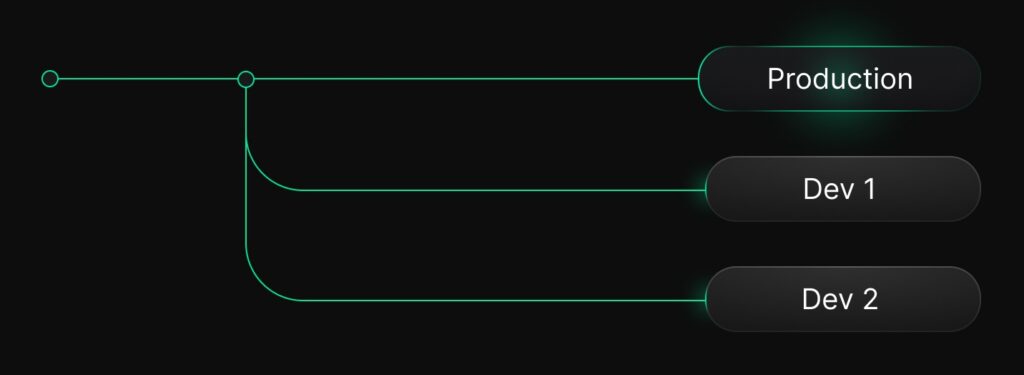
This is a very popular pattern: every engineer gets their own isolated environment by creating a dev branch from production. This gives you:
- Isolation – no stepping on each other’s changes
- Up-to-date reflection of production
- Affordable resource-wise (no storage duplication, only adds costs when actively used, you can add a very small compute endpoint to it)
What if you have PII and can’t branch directly from production: You first create an anonymized version of production using anonymized branches, and then derive your dev branches from there.
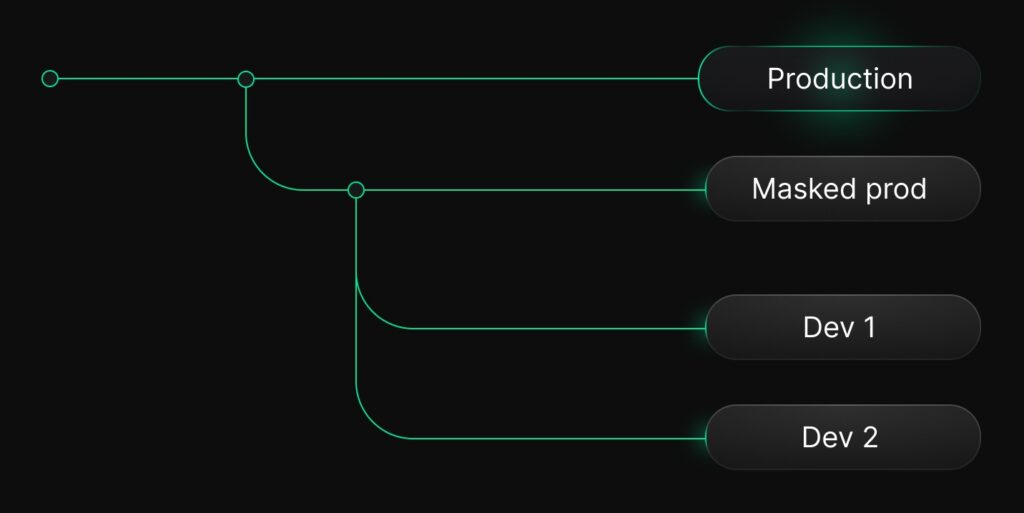
The shared development branch
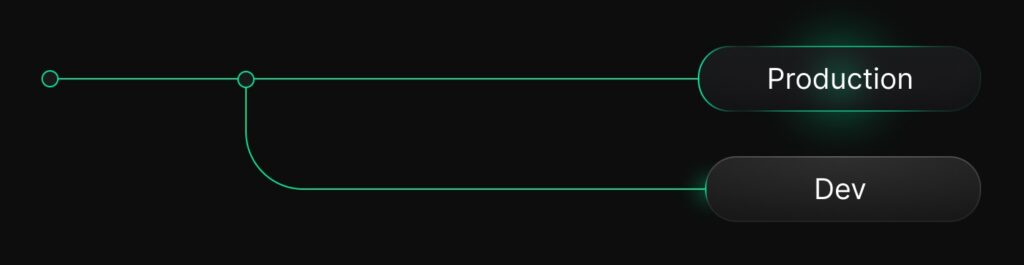
A variant of the above (e.g. if you don’t have a large team that’s working on different things in parallel) is to keep a single, relatively long-lived* dev branch where ongoing feature work happens, also derived from production / from an anonymized version of prod if you have PII.
What we mean by relatively long-lived: You’ll still have to resync this branch with production, even if you don’t delete it. This is very simple to do in Neon, you can just run a reset from parent action regularly to make sure your dev environment still reflects production accurately.
Branch-per-pull-request
This is also one of the most-loved Neon workflows and the closest analogue to Git. You would set things up so every PR automatically gets its own database branch, giving you
- An deployments with realistic, isolated data to run tests end to end
- A safe environment to run migrations specific to the PR
- A low-management option – you can configure the integration so the branch is deleted the moment the PR is merged or closed
You have a staging branch, these branches can derive from staging. If not, you can derive them directly from production, or from the anonymized version of prod.
Automation
You can also automate branching as part of your CI. The most common building blocks are:
- Create branch, e.g. spin up a new branch per test run
- Delete branch, e.g. clean up ephemeral branches once a test run is done
- This matters more than it sounds to keep your costs low – if you keep branches around too long, they may fall outside the history retention window and start incurring costs.
- Schema diff, to compare the schemas of two branches and post a diff as a comment on a pull request
- This is extremely useful when validating a migration: run it on a branch, compare schemas, and review the diff directly in your PR.
Time-travel and data recovery
Thanks to Neon’s storage architecture, you can instantly create an independent branch from any previous point in time. This makes branches extremely useful for restore workflows. Here are some of the most common ones:
Recovering dropped tables or deleted rows
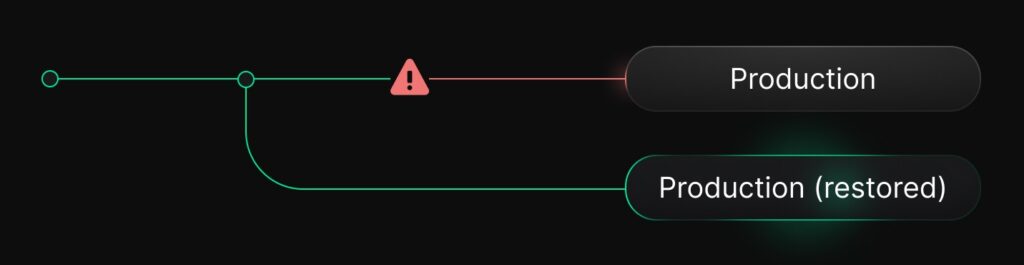
If a table was dropped or data was unintentionally removed, you can create a PITR branch from just before the incident happened. From there, inspect or export the data and restore only what you need without rewinding production.
Debugging bad migrations
When a migration behaves unexpectedly, you can similarly restore a branch from a previous point in time to access the state before the change. You can diff schemas, verify what the migration altered, or re-run it safely to understand the failure mode.
Auditing and compliance checks
For teams that need to examine historical records or reconstruct events, creating a branch from a previous snapshot gives you a read-only, isolated workspace you can explore without modifying or exposing production.
Best practices with recovery workflows
- Once you’ve recovered or inspected what you need, delete restored branches to avoid clutter.
- Use them as an investigative tool, not an environment. Restored branches are not intended for long-running workflows.
- Take advantage of schema diffs. For debugging migrations, compare schemas between the restored branch and your current branch to see exactly what changed.
- Beware of storage costs. The history preserved to support instant restores contributes towards your overall storage footprint. By default, Neon retains history for 6 hours on Free plan projects and 1 day on paid plan projects. If you don’t need much recovery capability, you can reduce your restore window to lower costs, to find the right balance between restore capability and cost.
Time to Add Branching to Your Project!
The branching workflows presented here are a new way to do things, but they make development safer and faster – and the truth is that they only take a few seconds to try. Many teams start with one simple workflow (a dev branch, a PR branch) and quickly get converted, wondering how they ever worked without it.
If you haven’t used branching before, pick one of the workflows above and spin up your first branch on the Free Plan. If you have any questions, tell us on Discord.