---
title: Neon Auth Components
subtitle: Pre-built components to make your life easier
enableTableOfContents: true
tag: beta
---
In the previous guide, we initialized Neon Auth. This time, we will take a quick look at some of the most useful components.
For the full documentation of all available components, see the [components reference](/docs/neon-auth/components/components).
## ``
The `` component shows the user's avatar that opens a dropdown with various user settings on click.
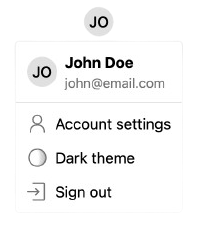 ```tsx title="page.tsx"
import { UserButton } from '@stackframe/stack';
export default function Page() {
return ;
}
```
## `` and ``
These components show a sign-in and sign-up form, respectively.
```tsx title="page.tsx"
import { UserButton } from '@stackframe/stack';
export default function Page() {
return ;
}
```
## `` and ``
These components show a sign-in and sign-up form, respectively.
 ```tsx title="page.tsx"
import { SignIn } from '@stackframe/stack';
export default function Page() {
return ;
}
```
All Neon Auth components are modular and built from smaller primitives. For example, the `` component is composed of the following:
- An ``, which itself is composed of multiple `` components
- A ``, which has a text field and calls `signInWithMagicLink()`
- A ``, which has two text fields and calls `signInWithCredential()`
You can use these components individually to build a custom sign-in component.
To change the default sign-in URL to your own, see the documentation on [custom pages](/docs/neon-auth/customization/custom-pages).
## Others
Neon Auth has many more components available. For a comprehensive list, see the [components reference](/docs/neon-auth/components/components).
## Next steps
In the next guide, we will do a deep-dive into retrieving and modifying user objects, as well as how to protect a page.
```tsx title="page.tsx"
import { SignIn } from '@stackframe/stack';
export default function Page() {
return ;
}
```
All Neon Auth components are modular and built from smaller primitives. For example, the `` component is composed of the following:
- An ``, which itself is composed of multiple `` components
- A ``, which has a text field and calls `signInWithMagicLink()`
- A ``, which has two text fields and calls `signInWithCredential()`
You can use these components individually to build a custom sign-in component.
To change the default sign-in URL to your own, see the documentation on [custom pages](/docs/neon-auth/customization/custom-pages).
## Others
Neon Auth has many more components available. For a comprehensive list, see the [components reference](/docs/neon-auth/components/components).
## Next steps
In the next guide, we will do a deep-dive into retrieving and modifying user objects, as well as how to protect a page.