




2026 is starting off hot, and skills are suddenly everywhere. The Agent Skills spec is now supported across all major coding agents and increasingly adopted by developer tools, including Neon.
But let’s start from the beginning.
The origins of agent skills
The concept of agent skills didn’t arrive fully formed:
- Anthropic published the skills spec, and initially only Claude Code supported it.
- Cursor had skill support behind a feature flag for a few weeks but distribution was an issue.
- Claude Code has plugins for distribution, but how do you share skills for Cursor users?
- This problem was solved early this year, when Vercel published a large React best-practices skill and simultaneously introduced the
npx skillsCLI, which finally solved the distribution problem.
https://twitter.com/rauchg/status/2012345679721771474?ref_src=twsrc%5Etfw
- Now skills can be shared by just publishing them in a public GitHub repository, and every major harness (Claude Code, Cursor, VS Code, OpenCode, Antigravity) can be selected and configured by npx skills.
What agent skills are (and why they matter)
With the ecosystem in place, the shape of agent skills has become clear:
- Agent skills package instructions, scripts, and references into a folder that an agent can load when needed.
- The core of every skill is the
SKILL.mdfile, which acts as the entry point and gives the agent a high-level map of what the skill can do. - When a task matches, the agent pulls in more detailed guidance on demand. This design keeps context small and helps the agent follow a structured workflow.
What’s special about skills (compared to most previous rule or prompt-based setups) is that the spec assumes skills are always known to the agent. That promise is ultimately up to agent developers to uphold, but if it holds, it gives skill authors a reliable way to steer agent behavior.
This is a meaningful step forward from having to reference MCP resources or invoke slash commands in every prompt just to remind the agent to play by the rules (pun intended).
Our own early work
If you were already coding with AI, the need for something like agent skills (and a way to distribute them) was hard to miss. We felt that pain firsthand at Neon, so before the Agent Skills spec existed, we were already experimenting with a similar idea which we called “AI rules”.
We published Neon AI Rules as a way to give coding agents reliable, structured guidance when working with Neon, starting with agent rules, examples, and a Claude Code plugin for local development. In hindsight, AI Rules surfaced the same underlying need the Agent Skills spec formalizes today.
Since then, we’ve transitioned this work to Agent Skills, reshaping it based on what we’ve learned about authoring skills and adopting the folder structure introduced by Vercel. It’s all skills now, a more portable and accepted standard.
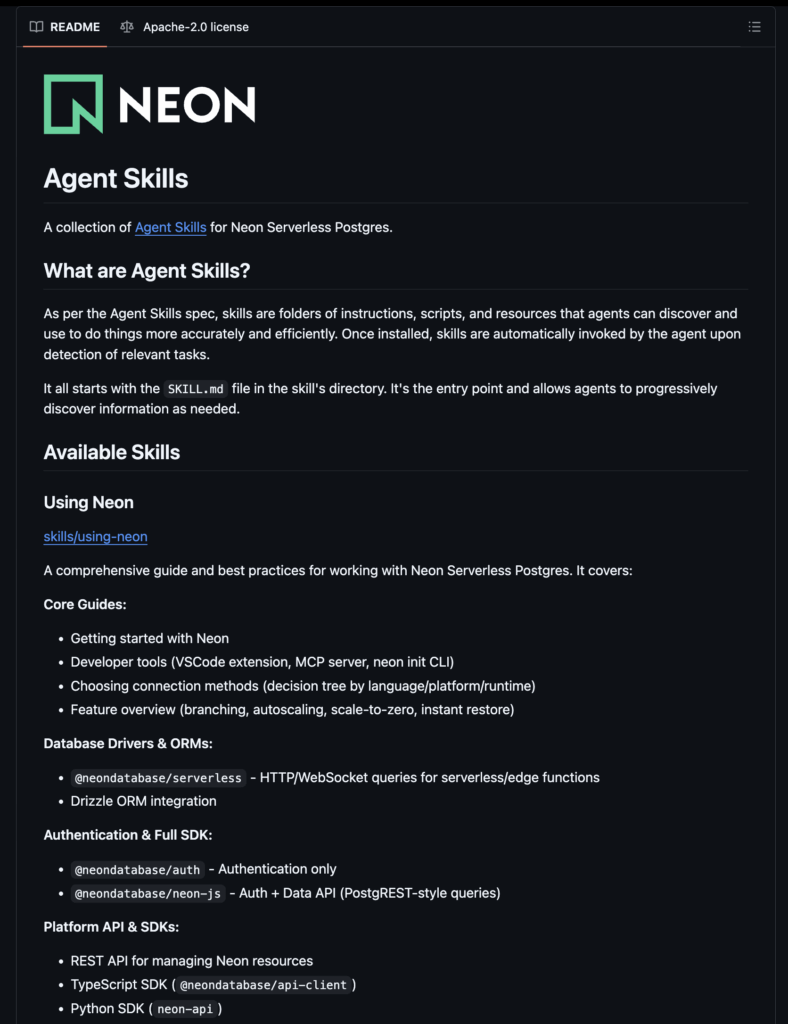
Introducing neondatabase/agent-skills
So we’re now launching our own skill repository, which lives at neondatabase/agent-skills. You can install it with:
npx skills add neondatabase/agent-skillsThis installs the using-neon skill, which includes guidelines and best practices for using Neon.
Why a single Neon skill?
You may be wondering why we shipped only one Neon skill instead of one per feature. The reason is simple: the SKILL.md file is always loaded into the agent’s context (or is always considered available by the harness). That means we want to keep this file small, stable, and long-lived.
Neon has a large surface area. If we create a top-level skill for every part of Neon, we would either overload the context or force users to install many skills. Both are unnecessary. It’s cleaner to ship one skill that gives a clear overview of Neon and then links into deeper detail.
Progressive discovery: how the using-neon skill is structured
Modern coding agents are very good at progressive discovery, the same pattern you see in UI navigation when moving from menu → submenu → detail. Instead of giving the agent everything up front, we let it discover information step by step.
The Neon skill follows this pattern:
SKILL.mdgives a tight overview of what the skill covers.- It points to files in a
reference/ directory. - Those reference files point to specific Neon docs pages.
- The agent is prompted to
curlthe right docs page when it needs details.
This keeps the top-level skill small. It also makes navigation predictable: the agent follows the references like a decision tree until it has the information it needs.
The docs stay the source of truth
Another reason we rely on progressive discovery is that skills can go stale. Once a user installs a skill, it lives on disk until they reinstall it with npx skills add neondatabase/agent-skills.
That works, but most users won’t update their skills often. If we packed too much static content into the skill, it would drift away from the current state of the Neon API. So instead, we keep the source of truth in one place: the Neon documentation.
We’ve optimized our docs for AI:
- We publish an
LLMs.txtfile with a list of all documentation. This serves as the index for agents. - Our docs accept
Accept: text/markdown, so a simple curl returns clean Markdown. - We put a lot of thought and our docs in general for a better developer experience which also serves agents well.
The skill’s job is not to copy the docs; its job is to help the agent find and retrieve the right docs page at the right time. This avoids staleness and keeps the skill lightweight.
How the using-neon skill works with our MCP server
Agent skills and MCPs actually solve different problems, so they work well together:
- The
using-neonskill provides best practices and instructions for reusable workflows, and decision logic. - The Neon MCP exposes real capabilities as authenticated, structured tools.
In other words: the Neon skill teaches the agent how to work with Neon (how to set up a new project, what connection method to pick based on the project architecture, how to set up different ORMs, how branching workflows looks like). And the MCP server lets the agent act (create branches, inspect projects, list databases, query a database, and so on).
It’s helpful to think of skills as the reasoning layer, and MCP as the capabilities layer. Both matter, but for different reasons.
Add using-neon to your project
Thanks to npx skills, installing agent skills across coding agents is now straightforward. Check the repository out on GitHub here: https://github.com/neondatabase/agent-skills, and install our using-neon skill using npx skill add:
npx skills add neondatabase/agent-skills