



Neon Object Storage is generally available
It was available to all users free of charge during the beta; see pricing for current costs. Deploy it and give us feedback, or read the GA announcement.
We just launched Neon Object Storage, a branch-aware, S3-compatible object store built into the Neon backend. If you've used Neon branches before, you know the workflow: branch main into a child and get an isolated copy of your database in about a second. Object Storage adds files to that picture. When you create a branch, the child also inherits your buckets and objects at that point in time.
We made Object Storage branchable because that's our core operating philosophy. Neon isn't shipping a database with extras bolted on. We're building a backend for apps and agents where Postgres, files, Functions, Auth, and the AI Gateway share the same branch semantics.
Branching Postgres + files in one API call
When you create a branch, you get one branch_id that forks both your Postgres data and your Object Storage buckets:
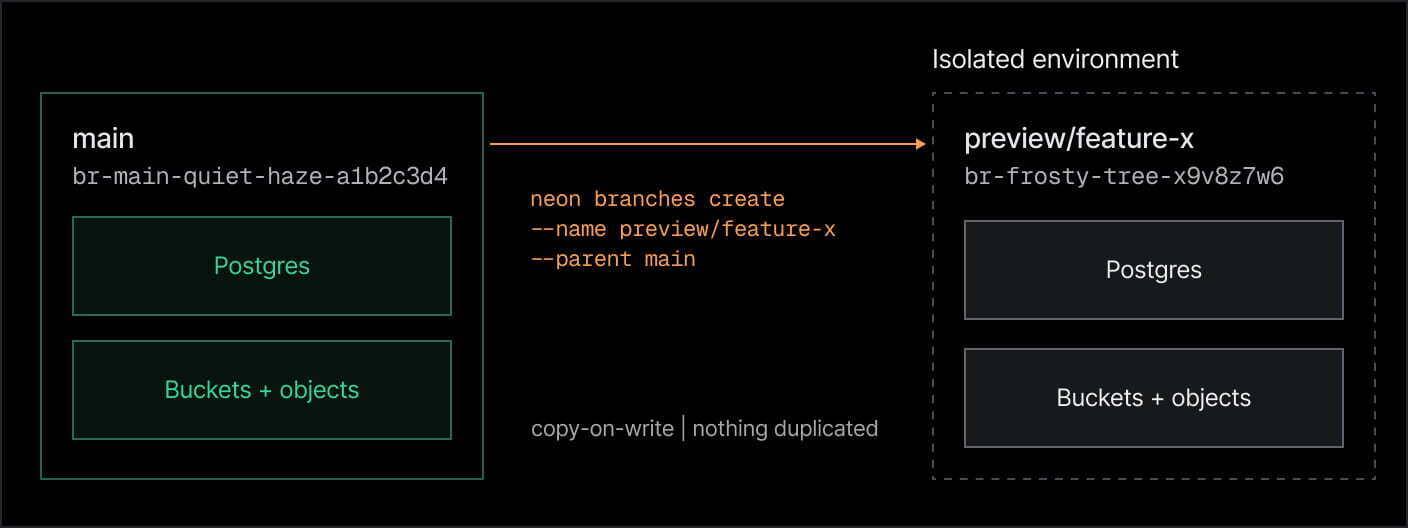
- Data + files together. The child inherits your database and your buckets/objects at that point in time.
- Same workflow as Postgres branches. Create preview branches, PR environments, agent runs - files follow the same branch semantics you already use for data.
- Isolated by default. Uploads and deletes on the child never touch the parent or sibling branches.
- Copy-on-write. The storage bill only grows if the branch diverges, nothing gets duplicated upfront.
- Disposable. The child branch can be deleted as easily as it was created, without altering the parent.
The ability to branch with your database is the central feature of Neon Object Storage, so it's worth pausing to explain the Neon branching experience a bit more.
A recap: how Postgres branches on Neon
Lakebase Postgres runs standard Postgres on the lakebase architecture, with compute and storage decoupled. Compute is where queries run, and storage is where data lives - but the storage layer is custom. It runs on copy-on-write versioned by WAL, storing Postgres pages as history so we can point at a particular page without duplicating the storage underneath.
That is what happens when a branch is created. A branch starts as a pointer into the same underlying pages as its parent. Nothing is copied at create time: parent and child read the same bytes until one of them writes. The moment a row changes, that branch writes a new page for it, but everything that hasn't changed stays shared.
In practice, what this means is:
- You can create as many branches as you want without multiplying storage costs upfront
- Branching a 100 TB database feels exactly the same as branching a 10 MB one; it's instant, and you only pay for compute while that branch's compute is running (it scales to zero when idle)
On the lakebase architecture
This design defines a new kind of OLTP database. Get all details on how things work..
Making files branch with your database
Neon Object Storage does not reuse exactly the same branching machinery as the database - we built a lineage-and-versioning system that works together with it:
When you create a Neon branch, both systems branch together under one shared branch_id:
- Postgres branches through the pageserver's page-level copy-on-write
- Object Storage forks through lineage and object versions
Each Object Storage branch keeps a lineage: an ordered record of itself, its parent, and its parent's parent, back to root. Every object write on a branch becomes a new version row, tagged with a version number
- Creating an Object Storage branch is one write. The child's lineage becomes the parent's lineage with the child's entry added at the front. The objects themselves don't move.
- Looking up a file walks that lineage
- Deleting a file the child inherited doesn't touch the parent: the child adds a version marked deleted, and lookups on that branch return that from then on
This setup carries over the essential properties of our branching experience to files. Branching stays instant no matter how much the parent has stored, isolation is the default, and you don't pay for duplicated object storage unless the branch diverges. Compute on the branch still scales to zero when idle.
Branch databases + buckets as many times as you want. You don't pay for storage copies or idle compute
This last point on costs is worth emphasizing. Because Lakebase Postgres branching is copy-on-write, creating a branch does not duplicate your database storage - and the same is now true for your Object Storage buckets. You (or your agent) can automatically create a Neon branch for every session, PR, experiment, or version, and only pay for compute while the branch is actively doing work.
This branching economics has a huge effect for small and large teams alike. It changes how you do work: instead of having to deploy separate database + bucket instances (or point all your development databases to the same files), you can now create isolated environments where everything seems "duplicated" but it's actually all lightweight for deployment, deletions, and for your bill - you're being charged minimally for these environments.
Much more clean, especially in a world where agents manage our workflows.
We're expanding the Neon branching experience to the entire backend
The ability to branch backends instantly changes the game for agent workflows. Just as we expanded the Neon branching experience to files, we're doing the same thing with Functions, Auth, and AI Gateway, so your agent can instantly duplicate your entire backend into a lightweight isolated environment.
How it comes together
S3-compatible, with access via Neon
We implement the real S3 wire protocol. You can point the AWS SDK, boto3, the AWS CLI, or the Files SDK at your branch endpoint and authenticate with a Neon credential, without a separate cloud storage account.
Bucket visibility and access level (private or public_read) are set through Neon (Console, API, or neon.ts), not through S3 ACL or bucket-policy mutation calls. Access decisions stay in one place, so you're not maintaining two permission systems.
Provision your backend in one config file
neon.ts is Neon's infrastructure-as-code config. You declare Object Storage buckets (and other backend services) in one file, run neon deploy, and Neon provisions them on the linked branch and writes the AWS credentials into .env.local, without a separate cloud account to wire up.
It looks as simple as this. When you create a Neon project, you get a main Postgres branch; if you declare Object Storage in neon.ts, this main branch (and any child branch you create) will get its buckets provisioned alongside the database. From there, you or your coding agent can branch as many times as you need.
import { defineConfig } from '@neon/config/v1';
export default defineConfig({
  preview: {
    buckets: {
      'my-bucket': {}, // private (default)
      'public-assets': { access: 'public_read' },
    },
  },
});
neon deploy          # provisions buckets and writes AWS_* vars to .env.local
neon branches create --name preview/feature-x --parent main
Try it on the Neon Free plan
This is the era of branchable backends. We're extending Lakebase Postgres branching to files with Object Storage, Functions, Auth, and AI models. Tell your agent to instantly branch your entire backend to create isolated environments, with minimal costs and no maintenance overhead, and delete them just as quickly.
Start by deploying an entire Neon backend on the Free plan. You get up to 100 projects, with limits generous enough to actually build products.